
Facebook Messenger automation in Chennai gives a busy showroom or institute an assistant that never misses a Page message. MySA Business answers Messenger chats and Page comments in Tamil, English or the customer's own mix, from the Business Details you approved; saves interested people as leads with a name and mobile number; and calls every new Facebook Lead Ads lead with an AI voice assistant, usually within about a minute.
The Chennai businesses this suits
Chennai is known for its automobile industry, its silk and textile shops, its classical arts and a strong culture of education. A few scenarios, not named customers:
- Two-wheeler and car dealerships. Launch and offer ads bring test-ride requests through Lead Ads, and "on-road price?" in Messenger.
- Silk saree and textile stores. Festival and wedding collections posted on the Page bring comments like "price pls" and "do you ship?".
- Entrance-exam coaching centres. Parents message about batch timings, fees and demo classes, usually after office hours.
- Music and dance academies. Carnatic music, Bharatanatyam and instrument classes get enquiries about age groups, timings and trial classes.
Facebook Messenger automation in Chennai: how replies work
Sign in with Facebook, pick the Page, and choose which Business Details category the AI answers from. Facebook is enabled per workspace, with a limit on the number of Pages.
Language. The AI replies in the language the customer writes in: Tamil, English, Hindi or a mix. It answers only from what you approved, so it will not quote an on-road price or a fee you have not written down.
Reply timing. Instant, or wait 5, 10, 15 or a custom number of seconds (never more than 30) so that "hi", "saree price", "silk cotton" arrive as one question and get one answer.
Comments. Pick a mode for the Page: Off, Public reply, Private reply in Messenger, or Hybrid with a short public line plus a private message. Only comments that ask something are answered. A saree store posting a new collection might choose Private reply, so prices go to each buyer directly.
Templates. An image with text, a card, or a carousel with Link, Call and WhatsApp buttons, sent when a customer types a keyword, comments a keyword, or when the AI picks one.
Lead capture. The AI never asks on the first message. From the second message on, when the customer asks about price, booking, availability or a visit, it asks once for a name and mobile number. Any Indian mobile number written in a chat is saved as a lead.
More on each setting: Facebook Messenger automation.
From Messenger chat to a phone call
Many Chennai buyers want to talk before they visit. Intent-based calling, the "Call when the customer agrees" switch, covers that. Once a chat shows buying intent and the customer shares a number, the AI asks once whether your team may call. On a yes, an AI call goes out in the customer's language with a summary of the chat; on a no, the AI keeps helping in chat and does not ask again. One such call a day at most reaches the same number across Facebook, Instagram and WhatsApp, and your DND hours and wallet apply.
Lead Ads: the test-ride call
Lead Ads do not start a chat, so they go through a webhook campaign. Your ad setup or a connector posts each new lead to your MySA webhook URL; you map the fields once from the first lead, without code; and the campaign calls each new lead, usually within about a minute. You decide the cap on calls per customer per day and the minimum gap between calls. DND hours hold calls instead of dropping them, and a low wallet balance stops calls going out.
Example
A test-ride form fill arrives at 6:30 pm from a scooter launch ad. Tamil is the campaign's call language; the call is shown here in English.
AI: Hello Karthik, this is the showroom calling about the scooter test ride you asked for a few minutes ago. Is now a good time?
Karthik: Yes, tell me.
AI: Would you prefer the standard or the connected variant for the ride?
Karthik: Connected. Can I come with my wife on Saturday?
AI: Of course. Saturday morning or evening?
Karthik: Morning, around 10.
The call ends with a recording, an AI summary, sentiment and tags. Because a visit was mentioned, a reminder call on Saturday can confirm it.
Live data, the inbox and Channel Report
Offers and stock change through the month. With Custom APIs enabled, you can tick your own API under Live data in replies, for example a list of colours in stock, and the AI checks it before answering. An API that needs the customer's mobile number is skipped in Messenger.
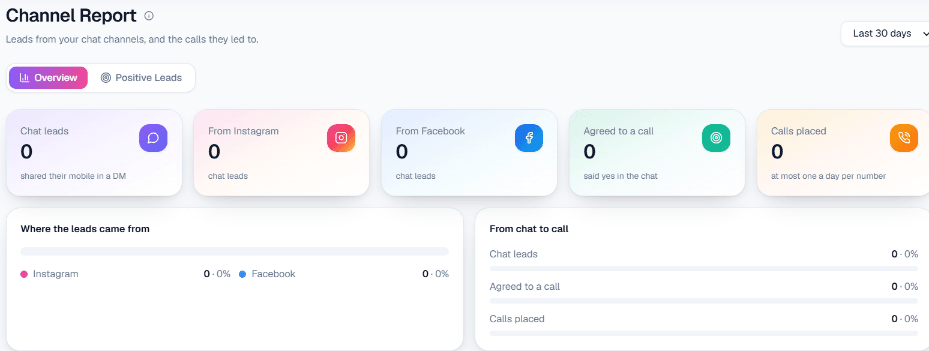
Every conversation is in the live inbox; your staff can reply by hand at any time. The AI does not pass chats to a person automatically. Channel Report shows chat leads, the Facebook share, agreed calls and calls placed for any date range.
What works today, and what it does not do
| Works today | Does not do |
|---|---|
| Tamil, English or mixed Messenger replies from your Business Details | Reply once Meta's 24-hour window has closed |
| Comment replies (Off, Public, Private, Hybrid) and templates | Send more than one private message per comment |
| Lead Ads leads called within about a minute | Send SMS or email to the lead |
| Intent-based calling and a live inbox | Run Messenger reminder sequences or auto-escalate to staff |
Getting started
Sign up, verify your mobile number to get ₹100 of Test credit in the separate Test workspace, and write your Business Details. Connect the Page, chat with it from a personal account, and send a test lead to the webhook's Test URL so you can take the AI call yourself. Tamil and English can each be chosen as the call language; listen to both on a test call before you go live. For inbound and outbound calls beyond Facebook, see AI calling software in Chennai.