
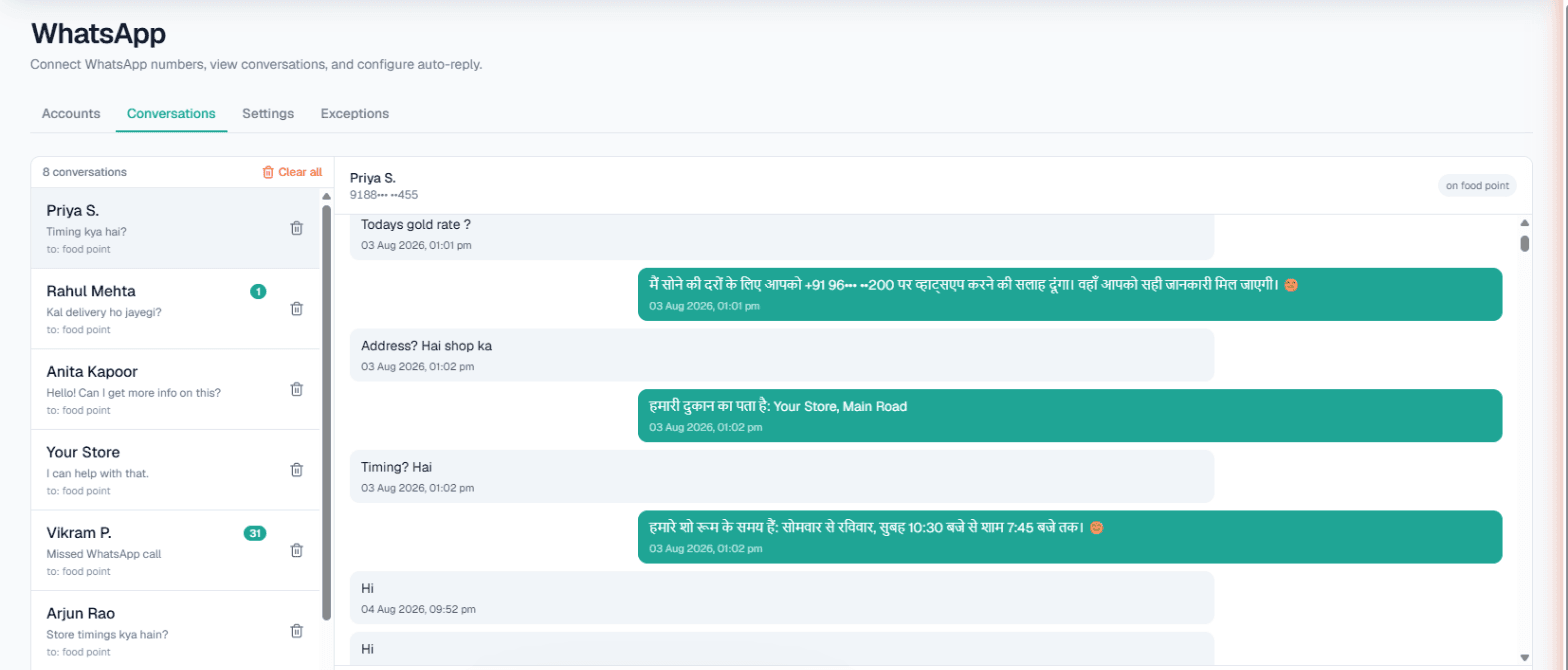
WhatsApp auto reply for business comes in three useful forms: a fixed message sent to everyone, an AI reply written for each customer's actual question, and a text sent automatically after a missed WhatsApp call. MySA Business offers all three per connected number. The right choice depends on whether you want to acknowledge a customer, answer them, or recover a call you could not pick up.
Why a plain away message is not enough
The away message in the WhatsApp Business app does one job: it tells people you are not around. It does not tell them the price, the timings or whether Saturday is free. The customer still waits, and many do not wait long.
Away message automation is a good start. The question is what you put in front of the customer next. Here are the three options in MySA, side by side.
| Auto-reply type | What the customer gets | Best for |
|---|---|---|
| Custom auto-reply | The same fixed message, every time | A simple acknowledgement, or a fallback when AI is off |
| Smart reply (AI) | An answer to their actual question, from your Business Details | Most businesses, most of the time |
| Missed-call auto-reply | A text (and optionally an AI voice callback) after a declined WhatsApp call | Shops and services that get WhatsApp calls they cannot take |
Custom auto-reply: one fixed message
A custom auto reply is exactly what it sounds like. You write one message, for example:
Example
"Thanks for messaging us. We reply between 10 am and 8 pm. For eye tests, share your preferred day and we will confirm."
Every customer gets it. It never surprises you, which is its strength. Its weakness is the same: it never answers the question. In MySA, the custom auto-reply is used when the AI is switched off for that number, or as a fallback.
Use it when:
- You are not ready to let AI answer yet and want a clean acknowledgement in the meantime.
- Your business genuinely has one message for everyone, such as a temporary closure.
Smart reply: an answer, not an acknowledgement
Smart reply (AI) reads each message and answers it from the Business Details category that number uses: services, prices, timings, address, policies. It replies in the language the customer wrote in, Hinglish included, and it does not invent anything you have not approved.
Three settings make it behave well on a busy number:
- Wait after last message. Holds the reply a few seconds (3 by default, up to 30) so a burst of short messages gets one coherent answer.
- Today's update. A note true only today, like "Doctor on leave this afternoon", used on top of your details.
- Business hours only. Restricts AI replies to 9 am to 9 pm if you prefer to answer late messages yourself.
If answers depend on data that changes, such as a rate or stock, a workspace with Custom APIs enabled can tick its own APIs under Live data in replies. More on that in WhatsApp chatbot for business.
The setup is on WhatsApp Smart Reply and in the WhatsApp docs.
Missed call auto reply on WhatsApp
Many customers do not type; they press the call button. The AI cannot pick up a WhatsApp voice call, so MySA handles it after the fact. With Missed call auto-reply on, the call is declined politely, and you choose what follows:
- Text the caller back with your own auto-reply message.
- AI voice callback. A real AI phone call back to the customer, billed at your call rate, with its own language, purpose, maximum duration, cooldown and daily limit per number.
- Only outside working hours. During your working hours (India time), calls ring through to your phone as normal; only after-hours calls are declined and followed up.
One limit to know before you rely on it: WhatsApp only shows the number of callers who have messaged you before. First-time callers are behind a privacy ID, so they are declined but cannot be texted or called back. If many of your callers are new, keep Only outside working hours on so your daytime calls still reach you.
When to use which
A simple way to decide:
- You get questions ("price?", "open today?", "home delivery?") → Smart reply. A fixed message wastes the customer's time.
- You are not ready for AI yet → Custom auto-reply, then switch to Smart reply once your Business Details are written.
- Customers call you on WhatsApp after hours → Missed-call auto-reply, outside working hours only.
- A message should become a phone call → add intent-based calling (Call when the customer agrees), where the AI asks once whether your team may call and places an AI call on a yes, or Keyword Auto-Call for keywords such as book.
Most businesses end up with Smart reply plus missed-call auto-reply on the same number. They do different jobs and do not conflict.
Keep the right people out
Auto replies to your mother or your delivery boy are embarrassing. Add them to the Exceptions list for that number, up to twenty numbers, one at a time or by CSV. They get no automatic replies, no auto-calls and no missed-call handling, and their calls ring through to you. Their messages still appear in the Conversations inbox, where your team can reply to anyone by hand.
What auto-replies will not do
- Listen to voice notes. A voice-note-only message gets a fallback text you set.
- Message people who have not written to you. Sending an approved template to a list is a separate tool, WhatsApp broadcasts, with opt-outs respected.
- Send SMS or email.
- Call inside your DND hours. A callback that falls in the window is held until it ends.
Getting started
- Sign up and verify your mobile number; the Test environment gets ₹100 of Test credit.
- Connect your number with a pairing code or QR scan.
- Write a short custom auto-reply first, so there is always a fallback.
- Fill in your Business Details and switch on Smart reply. Message the number from another phone with your customers' usual questions.
- Turn on missed-call auto-reply, outside working hours only, and call the number from a phone that has messaged it before.
There is no subscription. Callbacks and calls are paid from a prepaid wallet, and calls of 10 seconds or less are free.