
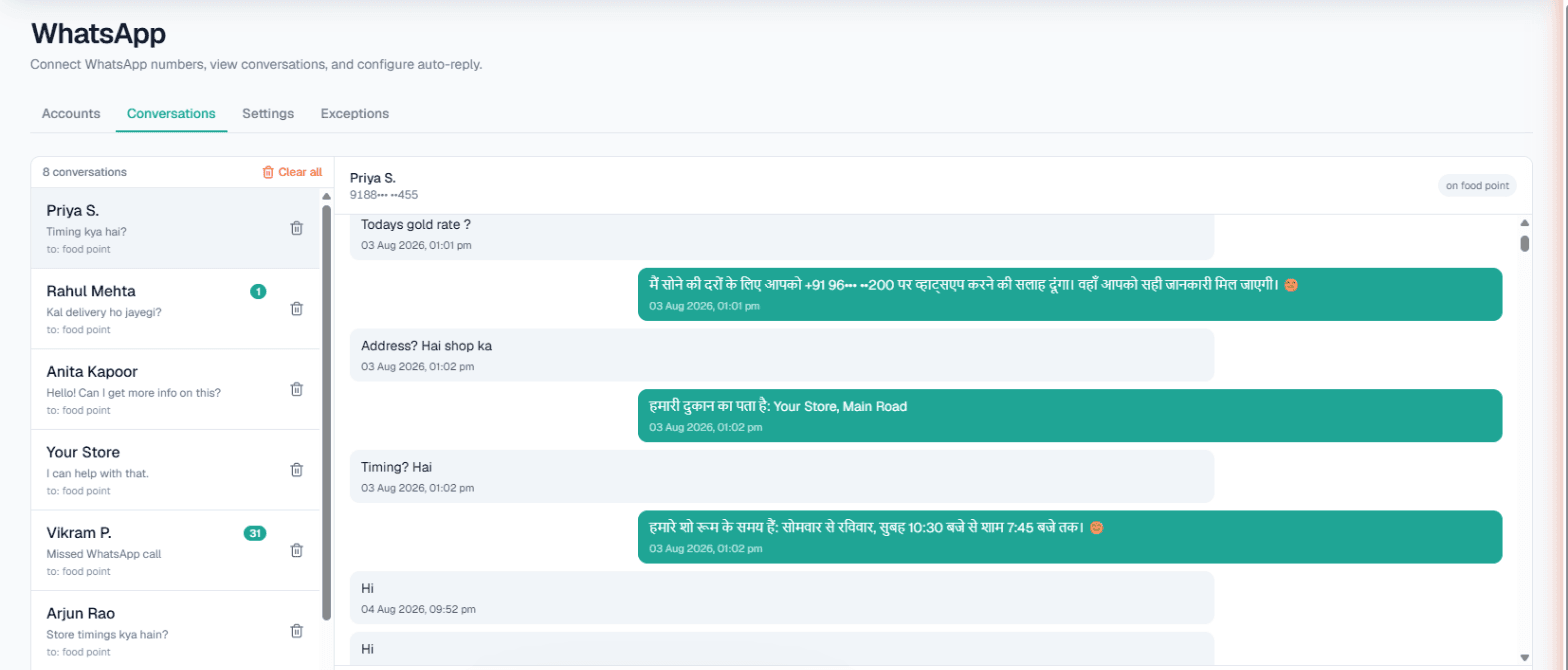
WhatsApp automation in Delhi lets a busy business answer the same twenty questions without anyone typing them: an AI replies on your own WhatsApp number from the Business Details you approved, in Hindi, English, Punjabi or Hinglish, whichever the customer writes. And when a message says the customer is ready, for example "shifting next week, call me", it can ring them with an AI call straight away instead of sending another text.
The Delhi pattern: same question, many times a day
Delhi businesses often run on referrals and on numbers passed around in family groups, so one WhatsApp number collects a steady stream of near-identical messages. "Rate kya hai?" "Kab free ho?" "Location bhejo." Each takes a minute to answer, and a minute multiplied across a day is the owner's whole evening.
The fix is not a chatbot menu of press-1-for-this. It is an assistant that reads the actual message, answers from what you wrote down, and knows when a phone call would serve the customer better.
What you can switch on
Your current number is linked through WhatsApp's Linked Devices with a pairing code or QR scan, no new SIM needed. For each number:
- Smart reply (AI): answers from that number's Business Details only, so rates and terms are yours, not made up.
- Custom auto-reply: one fixed message if you prefer not to use AI on a number.
- Missed-call auto-reply: a declined WhatsApp call is followed by your text and, optionally, an AI voice callback. First-time callers are hidden by WhatsApp and cannot be reached.
- Keyword Auto-Call: up to five keywords per number; a matching message triggers an AI call.
- Intent-based calling: the AI notices a customer asking about price, availability, a visit or a quote and asks once if your team may call; on a yes, the call goes out with the chat summary.
See WhatsApp Smart Reply for the overview.
Delhi businesses this suits
Scenarios to show the fit, not case studies:
- Wedding vendors. Decorators, caterers, photographers and mehendi artists get date-availability and package questions in bulk during the season. What this number should do can steer every chat towards the event date and venue.
- Packers and movers. "Shifting", "transport", "quote" are clear signals. Keyword Auto-Call turns them into an AI call that collects pickup area, drop city and date.
- Electronics and mobile-accessory traders. Retailers ask about stock and dispatch. If stock lives in your own system, its API can feed the replies.
- Driving schools. Batch timings, fees and licence-test help, answered day and night, with Business hours only if you prefer.
Example: a Keyword Auto-Call for a moving company
Example
Customer (in Hindi): Hamein agle hafte Dwarka se Noida shifting karni hai, 2BHK ka saamaan hai.
The message contains the keyword shifting. Within the delay you set, an AI call goes out in the language you chose for Auto-Call.
AI on the call: Namaste, aapne abhi WhatsApp par Dwarka se Noida shifting ke baare me likha tha. Kaunsi date aapke liye theek rahegi, aur kya packing bhi chahiye?
The customer's own words open the call, so they do not have to repeat themselves. The call is billed to your Live wallet like any outbound call. If the wallet cannot cover it, that message is skipped at no charge, and a call that would land inside your DND hours is held until the window ends.
Live data, the inbox and broadcasts
Live data. Owners can add their own APIs under Integrations → My APIs (enabled per workspace) and tick them under Live data in replies. On calls, the API is read either before each outbound call or during the call when the customer mentions something specific; one mode per workspace, and a failed API never stops a call. Details: Custom APIs.
Inbox and exceptions. Every chat appears in Conversations, where your staff reply by hand whenever they want. Relatives, regular dealers and your own team go on the Exceptions list, up to twenty numbers per connected number.
Broadcasts. For a season announcement, send one approved WhatsApp template to a campaign list or a CSV, now or scheduled, with opted-out numbers skipped. It uses a connected provider (Meta WhatsApp or Automate Chats) and only the Owner sees it. See WhatsApp broadcasts.
What works today, and the limits
| Works today | Limit or catch |
|---|---|
| AI replies in the customer's language | Voice notes are not heard; a fallback message goes instead |
| Keyword Auto-Call | Five keywords per number, whole-word match; 1–6 hour gap, 1–10 calls a day |
| Intent-based calling | Asks once; one chat-started call a day per number across channels |
| Missed-call text-back | Only callers who have messaged you before |
| Shared inbox | No automatic hand-over to a person |
| Broadcasts | Approved templates only; starts at 1,000 people per rolling 24 hours |
For answering your phone line with AI too, read AI calling software in Delhi.
Getting started
- Sign up, verify your mobile and use the Test workspace with its ₹100 of Test credit.
- Write Business Details: services, rate ranges you are happy to share, areas served, timings.
- Connect the number and send it a Hindi and a Punjabi message from another phone.
- Hindi, Punjabi or Hinglish can be chosen as the call language. Press Try now or place a Test call and listen before switching Auto-Call on.
- Top up the prepaid Live wallet; there is no subscription.