
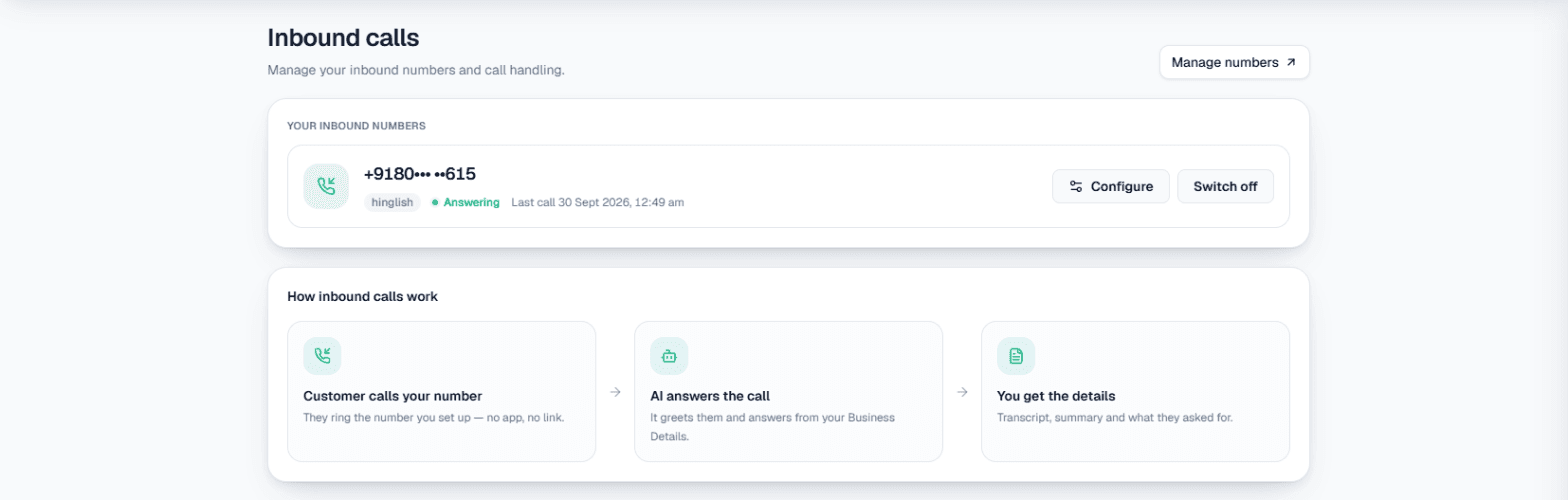
After-hours call answering means the calls that reach your business when nobody is there to pick up (after closing time, on Sundays and holidays, during the lunch break) are still answered, and whatever the caller wanted is waiting for your team when they are back. In MySA Business that job is done by the AI on your inbound number: it answers from your Business Details, books a slot or notes a call-back, and leaves a summary of every call for the morning.
This article is about the hours your team is not at the phone, and the handover the next morning. For the full setup of inbound answering, read our guides to an AI receptionist for business and inbound call automation.
Squad depth: why the bench wins long seasons
On 1 November 2026, Real Madrid won 3-0 away at Racing Santander in LaLiga, with Kylian Mbappé, Jude Bellingham and Yan Diomande scoring, while Vinícius Júnior was missing through suspension. One absent star did not change the result, because the squad had cover for him.
A small business usually has no such cover. The owner and two staff carry the phone from 10 to 8, and every hour outside that is an empty position on the pitch. The match is over, but the lesson holds all season: the business that wins is the one that still answers when its regulars are resting.
The hours nobody is at the phone
Most unanswered calls fall into a few predictable gaps:
- After closing time. A customer finishes work at 8, eats, and rings at 10:30 PM to ask about tomorrow.
- Sundays and holidays. The shop is shut, but the customer has the day free to plan.
- The lunch break. Half an hour when the counter is empty and the phone keeps ringing.
- The busy hour. Everyone is with a walk-in customer, so the call goes unanswered even though the shop is open.
A missed call at night does not ring again in the morning. The customer has usually called someone else by then, or forgotten.
Who covers which hour
Think of it as a rota, with the AI as the player who never needs rest.
| Hour | Who answers | What happens to the caller |
|---|---|---|
| Shop hours, staff free | Your team, or the AI if the number is AI-answered | Served at once |
| Shop hours, staff busy | The AI | Answered, then handed to a person if you set up call transfer |
| Lunch break | The AI | Questions answered; bookings offered only outside the break |
| After closing, Sundays, holidays | The AI | Answered, booked or noted for a call-back in the morning |
| Your DND hours, if inbound is blocked | Nobody | The call is not answered |
Inbound is not blocked by default, so the AI answers around the clock. If you would rather nobody answers at certain hours, DND can block inbound calls for a window you choose. The two are separate switches: by default DND stops outgoing calls in the window and leaves inbound answered, which is usually what an after-hours setup wants.
What the AI does on a night call
On a number with inbound calls switched on, the AI answers from the Business Details category you chose for that number, in Hinglish by default or in the caller's language if you let it follow them. Write your holiday timings and Sunday hours into Business Details: on a night call, that is the only brief it has.
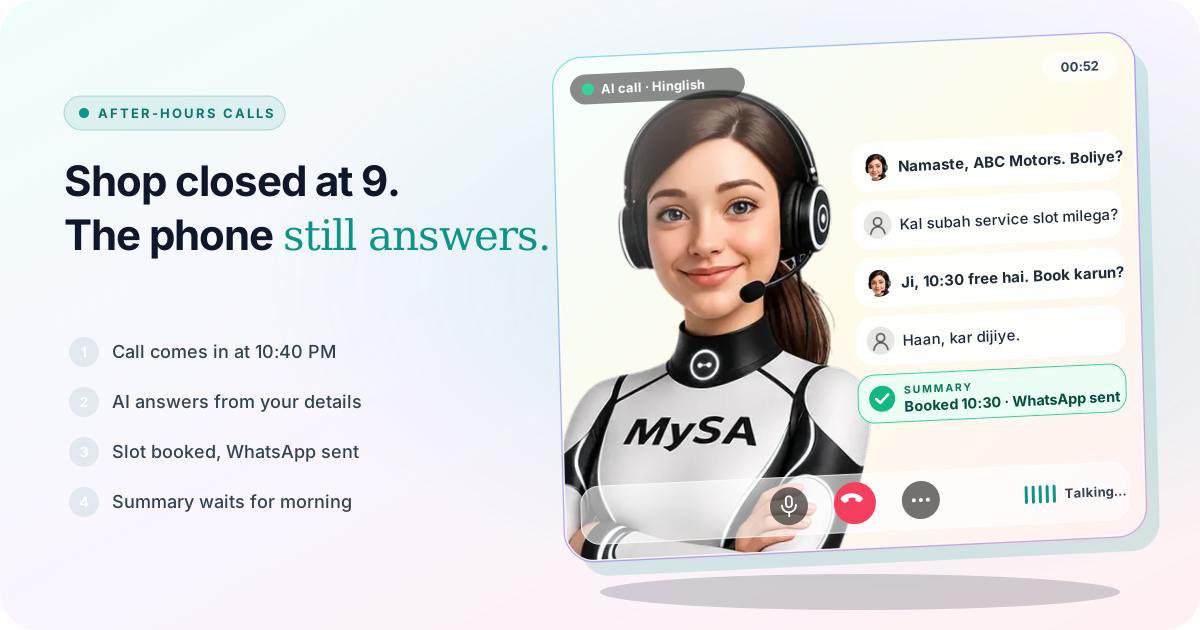
Example: a car service centre at 10:40 PM
AI: Namaste, ABC Motors. Boliye, main aapki kya madad karun? Caller: Kal subah gaadi service ke liye de sakta hoon? AI: Ji, kal subah 10:30 ka slot free hai. Book kar doon? Caller: Haan, kar dijiye. Pickup bhi hota hai kya? AI: Pickup ke baare mein team confirm karegi aur aapko call karegi. Booking ka confirmation WhatsApp par aa jayega.
The business is made up. With Appointments set up, the AI offers only free times inside your hours and books during the call, and the customer gets a WhatsApp confirmation. Nothing is ever offered during your lunch break, on screen or by the AI. Pickup was not in the Business Details, so the AI did not guess; it promised that the team would check. That becomes an Action required follow-up for the morning.
When the caller says "kal call karna"
With Call customers back when they ask on, a caller who asks to be rung back gets that call placed automatically, at the time they asked, as a normal outgoing call. Outgoing calls respect your DND hours, so a caller at 11 PM who says "das minute baad call karna" is not rung at 11:10 if that falls inside your quiet window. The call is held and goes out when the window ends. More on this in DND hours for AI calls.
When the caller wants a person
Late at night, nobody may be at the other end of a transfer. The call transfer settings have no time-of-day switch, so decide this on purpose: point the transfer at a number someone really answers, or untick Use on inbound calls when that number is not covered. Without transfer, a caller who asks for a person gets a Call from a person follow-up, which your team rings back themselves.
WhatsApp calls after closing time
The AI cannot answer WhatsApp calls, but it can make sure they are not simply missed. With Missed call auto-reply on, a WhatsApp call is politely declined and the caller gets a text with your Auto-reply message, or an AI voice callback. Choose Only outside working hours and calls ring through to your phone during your working hours (IST), and the auto-reply takes over after them. It reaches only callers who have messaged you before, because WhatsApp hides first-time callers. The setup is in WhatsApp missed call auto reply.
The next-morning handover
The point of after-hours call answering is not the night call itself; it is what your team can do with it at 10 AM. Instead of a list of missed numbers, they start from this:
- Call Logs. Every night call with its recording, AI summary, sentiment and tags, filtered to Inbound. Calls that need a person are flagged Needs a human. Turn-by-turn transcripts are not stored; the summary and recording are the record. See Call logs.
- Follow-ups. Action required questions the AI could not answer, Call from a person requests, and call-backs Scheduled for the morning. See Follow-ups.
- Appointments. Bookings the AI made overnight, marked with a small robot icon.
- Lead Feed. If it is enabled for your workspace, leads that match your rules go out by email (hourly or once a day), to a Google Sheet, a webhook, an API or WhatsApp. Inbound calls count, and the email shows which calls were inbound. See Lead Feed.
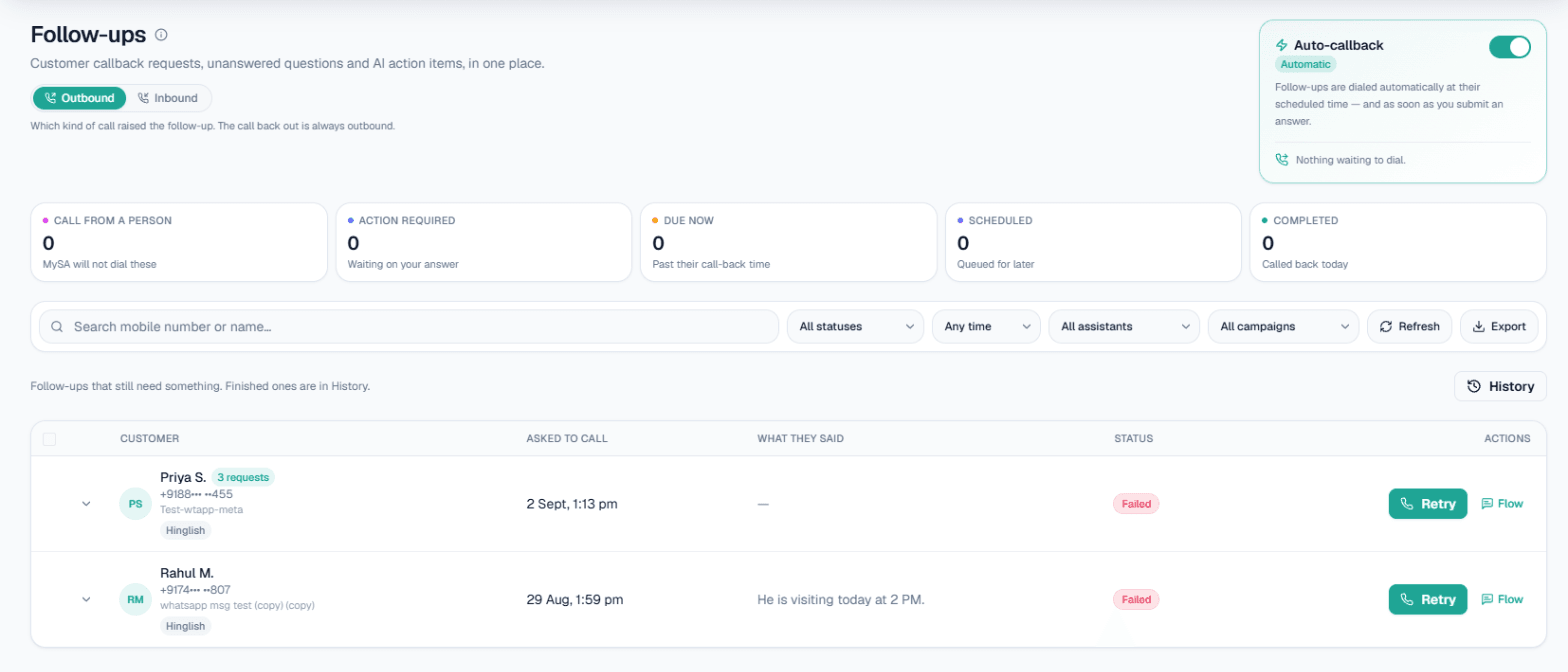
A simple morning routine, in this order:
- Call from a person first. These customers asked for a human and were promised one.
- Action required next. Type the answer under Your answer (MySA will say this on the call) and press Save & schedule call; the AI rings the customer with it.
- Then today's overnight bookings, and the warm calls in Call Logs that did not book.
What works today, and what it does not do
| Works today | Does not do |
|---|---|
| Answers your inbound number at night, on Sundays and at lunch | Answer a number you did not buy in MySA Business |
| Books slots during the call, with Appointments set up | Offer a slot inside your lunch break or outside your hours |
| Places call-backs at the time the caller asked | Ring a customer inside your DND hours; those calls wait |
| Declines WhatsApp calls and texts or calls back known callers | Answer a WhatsApp call, or reach a first-time WhatsApp caller |
| Leaves a summary, sentiment and tags for every call | Store a turn-by-turn transcript |
Two more limits worth knowing. Inbound works in your Live workspace only, and if the wallet is empty, the call is not answered, so check the balance before a long holiday.
Getting started
- Create a workspace and verify your mobile number to get ₹100 of Test credit in the separate Test environment.
- Write your Business Details, including Sunday hours, holiday dates and lunch break.
- Press Try now to hear the AI on your own phone.
- Go Live, buy a number, open Phone system → Inbound and press Set up inbound on it. Switch on Call customers back when they ask if you want call-backs.
- Top up the prepaid wallet, and set your DND hours for outgoing calls.
Calls of 10 seconds or less are free; longer calls are billed per started minute, and the Max call length you set caps what one call can cost. The rate for your workspace is shown in the console. Talk to sales for volume pricing.