
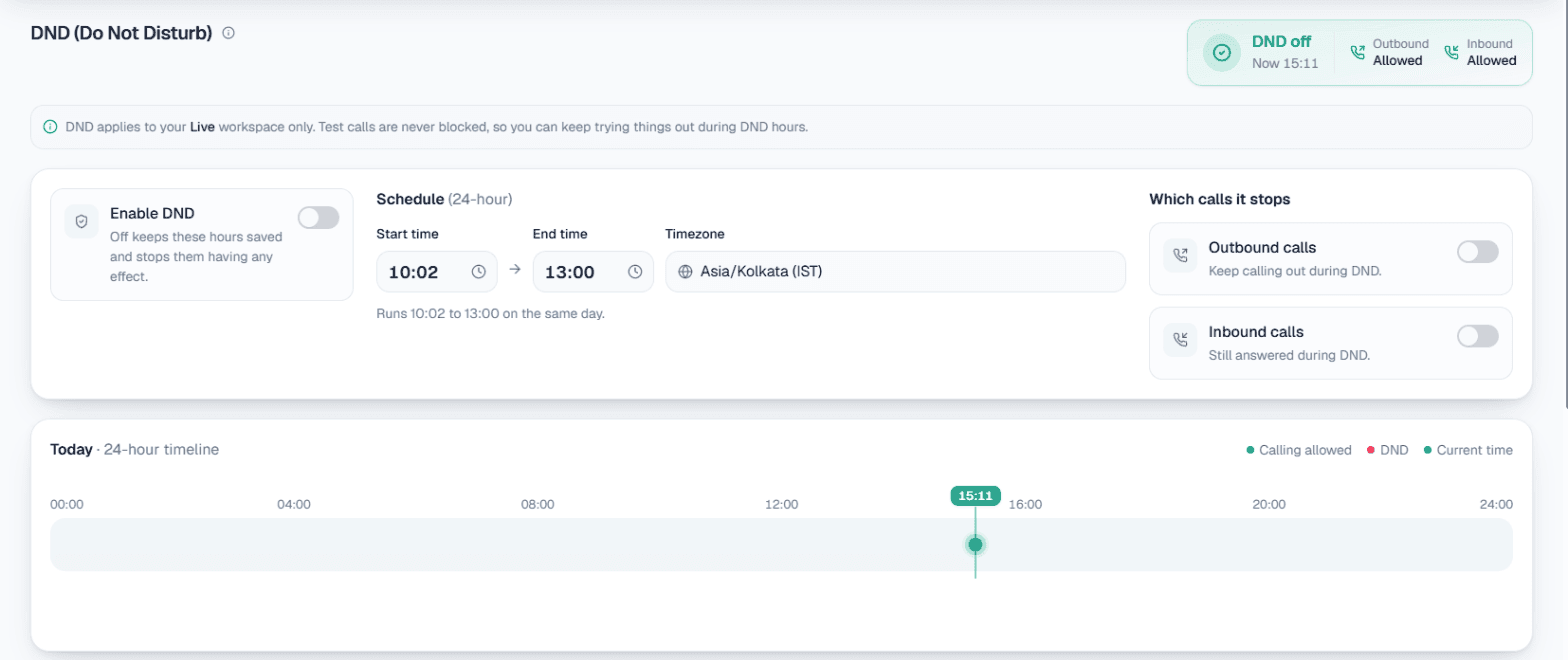
DND hours for AI calls are a daily quiet window in which your calling software must not ring customers. In MySA Business you set a start time, an end time and a timezone; any outbound call that comes due inside that window is held and goes out after it ends, instead of being dropped. Separately, you decide whether incoming calls are still answered during those hours.
Why automated calling needs quiet hours
A person dialling by hand stops when the office closes. Automated calling does not get tired, so the stop has to be written down. A campaign uploaded at 7 pm, a "call me later" that lands at 10:30 pm, or a webhook lead arriving at midnight would otherwise be dialled the moment it comes due.
Quiet hours protect three things: the customer's evening, your brand, and your answer rate. Someone woken by a sales call rarely becomes a buyer.
What DND does in MySA Business
DND controls two things, independently:
- Outbound calls: whether MySA may ring your customers during the window. Blocked by default.
- Inbound calls: whether a customer ringing you is answered during the window. Not blocked by default.
They are separate on purpose. A business that stops calling people at night usually still wants its own phone answered, so a customer who rings at 11 pm can still reach the AI on your number.
A few rules about how it applies:
- One window, with a start time, end time and timezone, applies every day.
- A window whose end is earlier than its start crosses midnight. 21:00 to 09:00 means overnight.
- DND belongs to the business, not to one workspace, and it only acts on Live calls. A Test call is never blocked, so you can still try things late at night.
- Only the workspace Owner can see or change it.
- Switching DND off keeps your hours saved. Turning it off for a week does not lose the times you chose.
Which calls DND hours cover
| Call type | Inside the DND window |
|---|---|
| Campaign calls (CSV, API, single, scheduled) | Held until the window ends |
| Follow-ups and callbacks ("call me later") | Held until the window ends |
| Visit reminder calls | Held until the window ends |
| Calls a customer agreed to in a WhatsApp, Instagram or Facebook chat | Waits and goes out when the window ends |
| Incoming calls to your number | Answered, unless you also block inbound |
| Test calls | Never blocked |
Appointment reminder calls have their own guard as well: a Calls start at hour in the Appointments settings, so a 10 am booking with a 3-hour reminder does not become a 7 am call.
Held, not lost: what happens when the window ends
A call that comes due inside the window is held, not cancelled. It waits and goes out once the window opens again, and nothing is charged while it waits. A campaign that looks stalled overnight is usually doing exactly what you asked; the calls appear the next morning.
Two consequences are worth knowing before you rely on it:
- A held call keeps the number and purpose it was created with. A morning release can dial about something a day old. If an offer expired overnight, stop the campaign rather than waiting for the morning.
- DND does not shorten a campaign. Every call is still made; it is only moved to after the window. Plan for a busier first hour.
And one troubleshooting note from the docs: if calls are not going out and DND is off, DND is not the cause. Check that the campaign is published and approved and that the wallet has balance.
Setting it up
- In your Live workspace, open Calling → DND (visible to the Owner).
- Set the Start time and End time.
- Pick the Timezone those times are read in.
- Choose what the window blocks: outbound, inbound, or both.
- Turn on Enable DND.
The page keeps a history of the last ten days, one snapshot per day plus a row for every change with who made it. If someone asks why calls stopped on Tuesday, the answer is there. The full reference is in the DND documentation.
Choosing respectful calling times
The software holds calls; deciding the hours is yours. Some practical guidance:
- Start with ordinary working hours. Many businesses keep outbound calls to roughly the morning to early evening on weekdays and Saturdays. A window such as 20:00 to 10:00 is a reasonable starting point to adjust from.
- Think about who you are calling. Office workers may prefer early evening; shop owners are busy at opening time.
- Treat Sundays and festivals with care. DND is one window every day, so on days you would rather not call at all, pause or schedule the campaign instead.
- Leave inbound open. Unless you have a reason, let the AI keep answering at night. A customer who chose to ring you is not being disturbed.
Getting customers' permission to call
Quiet hours are about when. Permission is about whether. Make sure you have the customer's permission to call before you put their number in a campaign: they filled in your form, asked for a callback, or are an existing customer expecting to hear from you. This article is general guidance, not legal advice; check the rules that apply to your business.
MySA has a few features that work from the customer's own request:
- Follow-ups are scheduled only when a customer asks to be called later, at the time they named. See follow-ups.
- Call when the customer agrees on WhatsApp, Instagram and Facebook asks once in the chat whether your team may call, and calls only on a yes. Our guide to intent-based calling explains it.
- Webhook campaigns call a new form or ad lead with a cap per customer per day and a minimum gap between calls. See webhook campaigns.
To check how all of this fits a real campaign, run it in the Test workspace first; see campaigns.