
A Facebook Messenger chatbot answers the messages your Facebook Page receives, and can also reply to comments under your Page posts, so a customer who asks "price?" at 11 pm gets an answer before they lose interest. With MySA Business, the chatbot is an AI that answers from the Business Details you approved, in the customer's language, and every conversation stays in an inbox your team can reply from. This guide walks through what to set up and what to expect.
Where a Facebook Page chatbot helps
Facebook Pages still bring steady enquiries for many Indian businesses: a furniture store's offer post, a tuition centre's admission notice, a caterer's menu photo, a local event. The questions that follow are predictable (price, location, timings, availability), but they arrive at any hour, and an unanswered Page looks closed.
A Facebook page chatbot covers two places at once:
- Messenger: the private conversations customers start with your Page.
- Page comments: the questions people post publicly under your posts.
Both are answered by the same AI that serves your Instagram account, WhatsApp number and phone calls, from the same Business Details. A customer gets the same answer wherever they ask.
Setting up Messenger auto reply
Connecting takes a few minutes. Sign in with Facebook, pick the Page, choose the Business Details category the AI should answer from, and the Page appears under connected accounts. There are no tokens or developer settings. The step-by-step guide is in Instagram & Facebook docs.
Then shape the Messenger auto reply:
- Reply timing. Answer immediately, or wait 5, 10, 15 or a custom number of seconds (30 at most) so several short messages get one reply.
- Live data in replies. If your workspace has Custom APIs enabled, tick your own APIs so answers that change daily, such as rates or stock, come from your system. An API that needs the customer's mobile number is skipped in Messenger DMs. See Custom APIs.
The AI does not invent prices or policies. If something is not in your details, it does not make it up.
Facebook comment auto reply
Each Page gets one comment mode:
| Mode | Under the post | In Messenger |
|---|---|---|
| Off | Nothing | Nothing |
| Public reply | AI answer under the comment | Nothing |
| Private reply | Nothing | AI answer as a DM |
| Hybrid | Short acknowledgement you can word yourself | AI answer as a DM |
Only real questions get a reply. A "Congratulations!" or a tagged friend is left alone. Meta allows one private message per comment, so a commenter receives one DM.
A tip from how Pages tend to work: offer and price posts suit Hybrid, because other readers see that you responded while the price itself goes privately. Informational posts, like holiday timings, suit Public reply.
Templates: cards and carousels in Messenger
Plain text is not always the best answer. The template library, shared by Facebook and Instagram, lets you build:
- Text + images, with up to 3 images.
- Card + buttons, up to 10 swipeable cards, each with up to 3 buttons: Link, Call or WhatsApp. On Messenger a Call button rings your number straight away.
A template goes out when a Messenger message contains one of its keywords, when a comment matches a template's comment rule (one post or all posts), or when the AI decides it fits. The same template reaches a customer at most once an hour. Samples such as Current offer and Price list are a quick start; see Social templates. For how a keyword comment becomes a private message, see comment to DM; the mechanics are the same on Facebook.
Lead capture and intent-based calling
A chatbot earns its keep when an interested customer leaves a number.
- From the customer's second message on, when they ask about price, booking, availability or a visit, the AI asks once for a name and mobile number. It never asks on a plain greeting, and it does not ask twice.
- Any Indian mobile number written in the chat is saved as a lead on Positive Leads, under From Instagram & Facebook.
With Call when the customer agrees on (intent-based calling), the AI then asks whether your team may call. On a yes, an AI call goes out in the customer's language with a short summary of the chat as its opening context.
Example
Customer (Messenger): Is the 6-seater dining set from your Diwali post still available? Delivery to Andheri?
AI: Yes, it is listed as available. Delivery charges depend on the area, so our team will confirm yours. Could you share your name and mobile?
Customer: Ravi, 98xxxxxx10
AI: Thanks, Ravi. May our team call you now to confirm the delivery date?
Customer: Yes.
An AI call goes out with the chat summary, and the lead shows the call's progress.
At most one such call a day goes to a number across Facebook, Instagram and WhatsApp. Your DND hours apply, and the call is charged from your wallet. If it could not be placed, the lead shows Agreed · call not placed so your team can ring the customer themselves.
If you run Facebook Lead Ads, that is a separate path: a webhook campaign can call each new form lead with AI, usually within a minute.
The 24-hour window and the Channel Report
Meta allows a business to message a customer only within 24 hours of their last message. Replies and templates both follow this rule, so the chatbot cannot message someone who went quiet last week, and there are no Messenger reminder sequences.
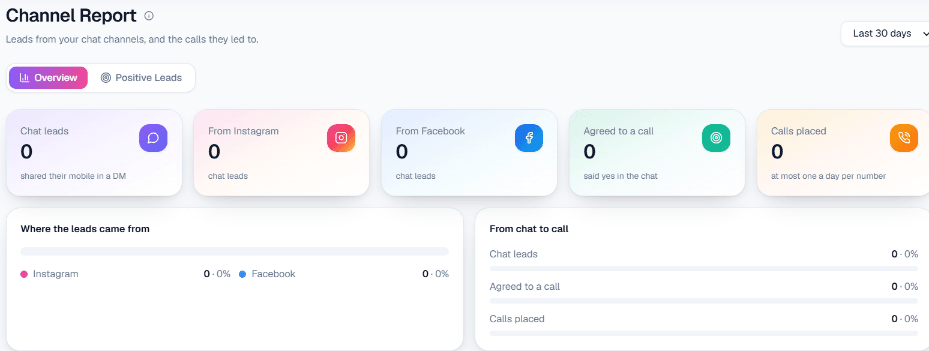
The Channel Report shows, for any date range, chat leads, how many came from Facebook versus Instagram, how many agreed to a call and how many calls were placed. Its Positive Leads tab lists each lead with the last message and the call status: Asked to call, Agreed · call queued, Agreed · call not placed or Declined a call.
Your team stays in charge
Every Messenger conversation is in the live inbox on the Facebook page in the console. Anyone with access can read along and reply by hand. There is no automatic escalation: the AI does not decide on its own to hand a chat over, so someone on your team should glance at the inbox during the day.
Getting started
- Sign up and verify your mobile number; the Test environment comes with ₹100 of Test credit.
- Connect your Page and pick its Business Details category.
- Set reply timing and a comment mode.
- Activate one or two templates from the samples, with your own numbers and links.
- Message your Page and comment on a post from a personal profile.
The overview lives on Facebook Messenger automation.