
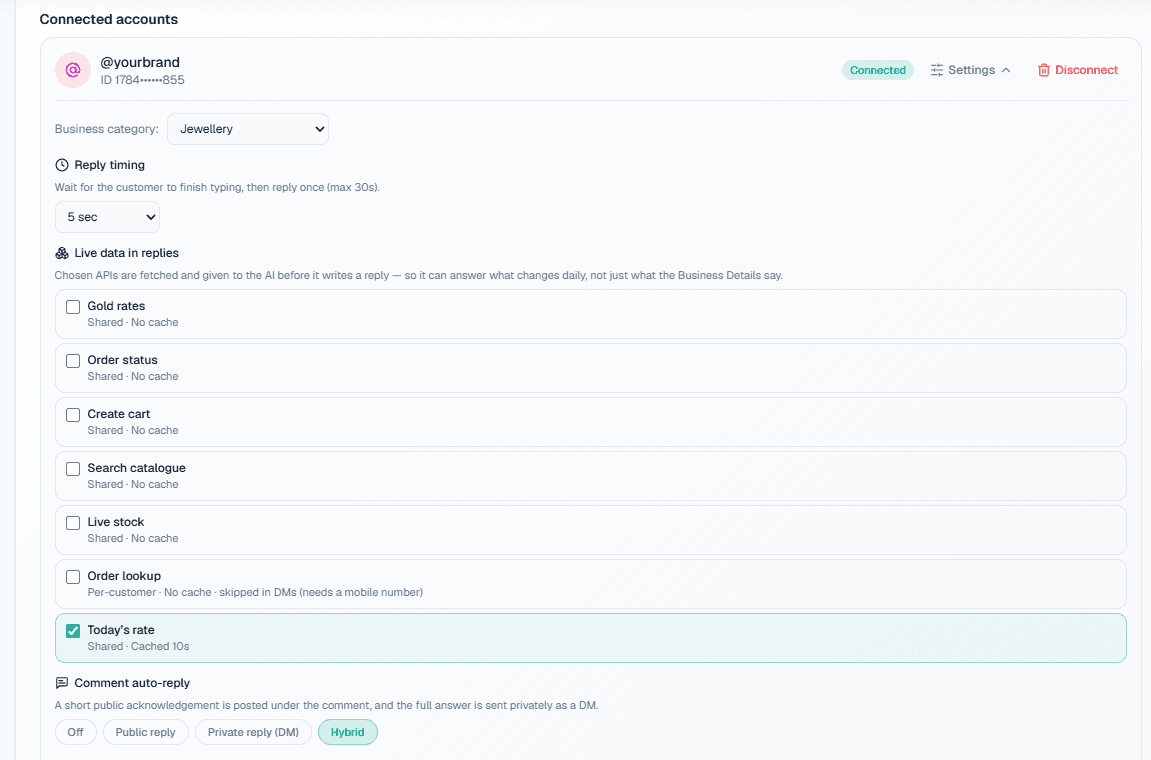
An Instagram auto reply bot answers the direct messages and comment questions your business account receives without someone typing each reply. A good one does more than send "Thanks, check your DM": it answers the actual question from your own details, knows when to stay quiet, and works inside Meta's messaging rules. This guide covers how MySA Business does it, setting by setting, so you know what to switch on and what to expect.
What an Instagram DM bot should get right
Most Instagram DM bot complaints come from three habits: replying to every message the instant it lands, replying to comments that were never questions, and making up answers. A useful bot avoids all three. In MySA Business the replies come from an AI that reads the Business Details category you chose for the account, in the language the customer writes in, and it does not invent prices, stock or policies.
You connect an Instagram Business account with Facebook Login (no tokens or developer screens), pick the category, and the account starts answering. Setup steps are in Instagram & Facebook docs.
Reply timing: merge the burst
People on Instagram type in fragments:
Example
"hi" "this kurta" "M size hai?" "price?"
A bot that answers "Hi! How can I help?" after the first line looks silly by the fourth. Reply timing fixes this. Choose:
- Immediately, replying to each message straight away, or
- 5 sec, 10 sec, 15 sec or Custom, waiting that long so the burst is merged into one clear reply.
The wait is capped at 30 seconds either way. For most shops, 10 seconds is a sensible starting point: fast enough to feel instant, long enough to catch the "price?" that follows.
Auto reply to Instagram comments: four modes
Comments are public, so the choice matters. Each account gets one mode:
| Mode | What happens | When it suits |
|---|---|---|
| Off | Comments are not answered | You prefer to handle comments by hand |
| Public reply | The AI replies under the comment | General questions where the answer helps everyone reading |
| Private reply (DM) | The AI sends the commenter a DM | Prices, personal details, anything you would not post publicly |
| Hybrid | A short public acknowledgement plus a private DM | Busy posts where other readers should see you responded |
In Hybrid you can write your own public acknowledgement text, such as "Details sent in your DM".
Two rules keep this sane. Only real questions get a reply, so praise and emoji comments are left alone. And Meta allows one private message per comment, so a commenter gets one DM, not several.
If you want a specific keyword comment (say, "LINK") to send a ready-made message, that is a template comment rule. The full comment-to-DM workflow is on Instagram comment to DM automation.
Templates: when text is not enough
Sometimes the best reply is a card with a photo and a button. The template library holds:
- Text + images: a message with up to 3 images.
- Card + buttons: a card with an image, a title and up to 3 buttons. Add up to 10 cards and the customer swipes through them as a carousel.
Buttons can be Link (opens a page), Call (Instagram has no call button, so it opens a small page with your number and a Call now button) or WhatsApp (opens a chat with your number).
A template is sent in three ways: when a DM contains one of its keywords, when a comment matches its comment rule, or when the AI decides it fits the conversation, based on the "When to send" description you wrote. The same template does not go to the same customer twice within an hour. There are six samples to start from, including Price list and Store location; see Social templates.
The 24-hour window
Meta allows a business to message a customer only within 24 hours of that customer's last message. This applies to Instagram AI replies and templates alike. In practice:
- Replies to fresh DMs and comments are inside the window.
- You cannot use the bot to message a customer who went quiet three days ago.
- There is no automatic follow-up sequence on Instagram. Re-engagement happens by phone, or when the customer writes again.
Lead capture without being pushy
An auto reply bot is most useful when it turns interest into a contact your team can follow up. MySA does this with restraint:
- Never on the first message. The AI answers normally first. It asks for a name and mobile number only from the second message on, and only when the customer asks about price, booking, availability or a visit.
- Once per chat. If the customer ignores it or says no, it does not ask again.
- Every number is saved. Any Indian mobile number written in a DM becomes a lead, with the name given or the profile name. A corrected number updates the same lead.
Chat leads appear on Positive Leads under From Instagram & Facebook, and on the Channel Report, which counts chat leads, leads from Instagram, customers who agreed to a call and calls placed.
Intent-based calling from a DM
With Call when the customer agrees switched on (intent-based calling), a DM can become a phone call. Once the customer shares their number, the AI asks in their language whether your team may call. On a yes, it writes a short summary of the chat and an AI call goes out in the language the customer was writing in, starting from what they asked. On a no, it keeps helping in the chat and does not offer again.
At most one such call a day goes to the same number across Instagram, Facebook and WhatsApp. Your DND hours apply, and calls are charged from your wallet like any other call. How the call side works is on AI voice agents.
What the bot does not do
- It does not hand a chat to a person automatically. Your team reads the live inbox and replies whenever they choose.
- It does not send messages outside the 24-hour window, or reminder sequences.
- In DMs it skips any live-data API that needs the customer's mobile number. APIs that return the same data for everyone, like today's rates, can be ticked under Live data in replies.
Getting started
- Sign up and verify your mobile; the Test workspace has ₹100 of Test credit.
- Connect your Instagram Business account and choose the Business Details category.
- Set reply timing to 10 seconds and comment mode to Hybrid or Private reply.
- Duplicate a sample template, edit it, and activate it.
- DM and comment on your own account from a personal profile to check the replies.
The feature overview is on Instagram DM automation.