
Lead tracking for AI calls means every call the AI places or answers ends with a record your team can act on: a recording, a summary, how the customer sounded, the topics discussed, and whether the call did its job. In MySA Business those records feed a Positive Leads list, several reports, and a Lead Feed that delivers leads to email, a Google Sheet, a webhook or an API, so nothing waits in the console for someone to remember to look.
What every call leaves behind
After each connected call, the AI records:
- A recording, playable in the page or downloadable.
- An AI summary, with What happened, a Suggested next step and What the customer asked when there is something to say. Calls that need a person are flagged Needs a human.
- Sentiment: positive, neutral or negative, or No response if the customer never spoke.
- Tags from your own list, such as Pricing or Site visit.
- Purpose outcome: whether the call achieved what it was dialled for.
Turn-by-turn transcripts are not stored. The summary and the recording are the record of what was said.
Positive Leads: the calls that did their job
Positive Leads lists the calls that achieved their purpose. That judgement needs a Purpose on the call, written in plain language: "Confirm interest in the 2BHK, ask the budget and a preferred visit date." The AI marks the call achieved or not against that goal; it does not invent its own verdict.
Chat leads appear on the same page under From Instagram & Facebook. From a customer's second DM on, when they ask about price, booking, availability or a visit, the AI asks once for a name and mobile number, and every Indian mobile number written in a DM is saved as a lead. A corrected number updates the same lead. For how a chat can turn into a call with the customer's consent, see our guide to intent-based calling.
Where to look, and for what
| Question | Screen |
|---|---|
| What happened on this one call? | Call Logs |
| Every call today in one table, with recordings and a CSV? | Detailed Report |
| How are leads from Instagram and Facebook DMs turning into calls? | Channel Report |
| How did one campaign perform, by people rather than calls? | Campaigns Analytics |
| How are calls trending, and how did customers sound? | Analytics |
| What do customers ask about most? | Tags |
| Who asked to be called back, or asked for a person? | Follow-ups |
- Detailed Report lists every call in the workspace, filterable by direction, campaign, status, sentiment, outcome, interest, purpose outcome or tag. Play recordings from the row, download up to 5,000 calls as a CSV, or switch on a webhook that sends every finished call to your server.
- Channel Report shows chat leads from Instagram and Facebook, how many agreed to a call, and how many calls were placed.
- Campaigns Analytics counts people reached as unique numbers, not calls, and splits Did the call do its job into achieved, not achieved and not judged.
- Analytics shows call volume, spend and a sentiment split where you can download the calls behind any mood. More on the analytics and sentiment page.
Call tags: what leads actually want
Tags answer a question a call log cannot: what are people calling about? Open Tags, pick a business category, and keep MySA's prepared tags (up to 10 per category) plus up to 5 of your own. After each call the AI reads the summary and applies only tags from your list.
Click a tag to see the calls behind it, or download the unique customers who had it. A Google Sheet card mirrors the tag board into a sheet you own every hour. See AI call tags.
Lead Feed: delivering leads where your team works
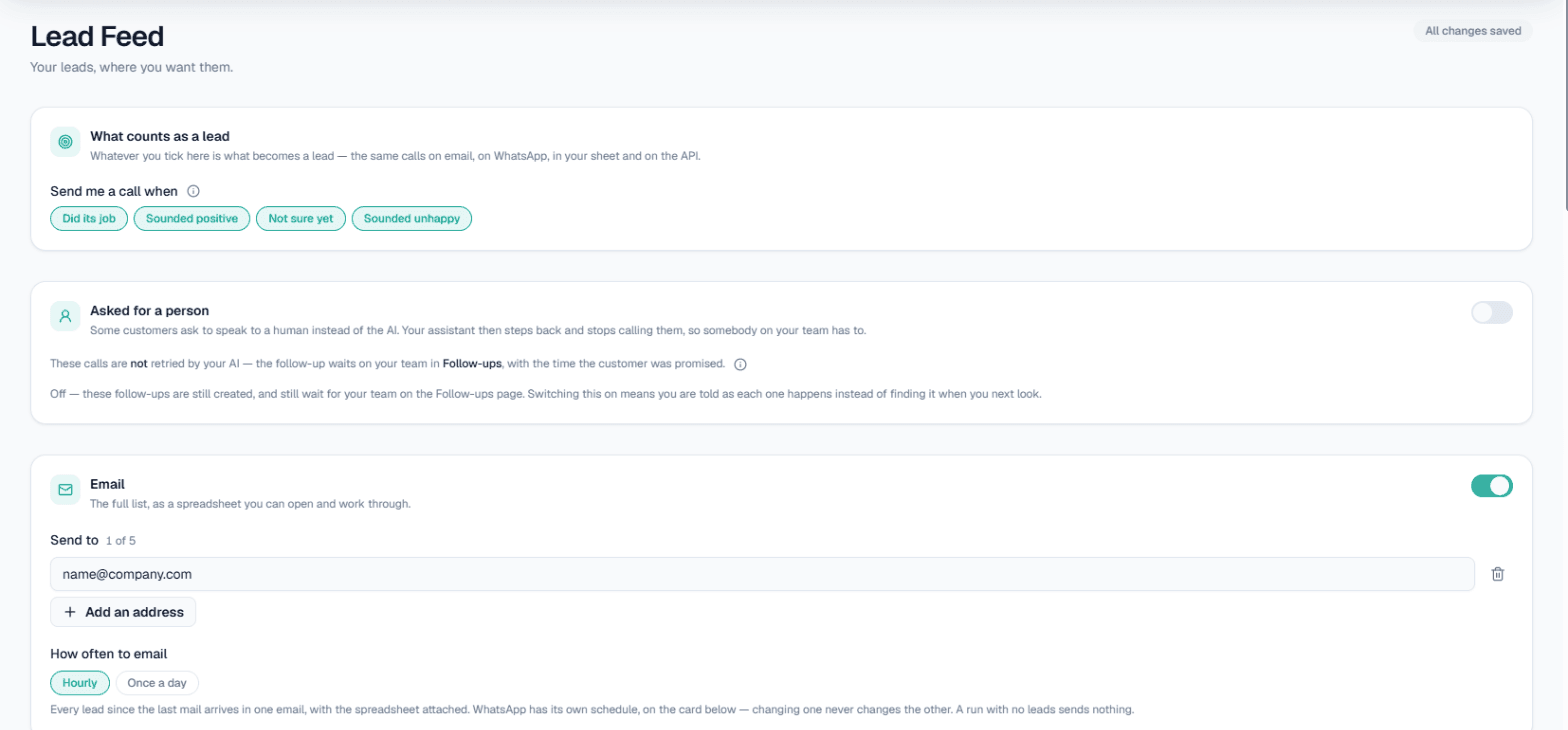
Lead Feed decides what counts as a lead and pushes it out. First, tick any mix of:
- Did its job (the same calls as Positive Leads)
- Sounded positive
- Not sure yet
- Sounded unhappy, if you want a team to win them back
A call matching two of these is still sent once. Then switch on the channels:
- Email: up to 5 addresses, hourly or once a day, with the name, a tap-to-call number, what was discussed and the suggested next step, plus a spreadsheet attached.
- Google Sheet: every new lead becomes a row in a MySA Leads tab within about five minutes. Rows are only added, so your own notes stay safe. Share the sheet as Editor, not Viewer.
- Webhook: each lead posted as JSON to Pabbly, Zapier, Make or your own URL within about half a minute, with retries. This is the usual way to get call leads into a CRM.
- API: a read-only feed URL your system can poll; Rotate it if it leaks.
- WhatsApp: a short nudge with the lead count and first names, request-only and charged per message.
Only connected Live calls count; Test calls and your own Try now calls never do. Both inbound and outbound calls are included. Setup steps are in the Lead Feed documentation.
Follow-ups: leads that are waiting on you
Some leads are not finished yet. Follow-ups collects them:
- Scheduled and Due now: a customer said "kal 3 baje call karna", and the callback is set for that time.
- Action required: the AI could not answer a question and promised to check. Type your answer and the AI shares it on the follow-up call.
- Call from a person: the customer asked for a human, so MySA never dials it; your team rings them.
Switch on Tell me when a customer asks to speak to a person in Lead Feed to be alerted the moment it happens. See follow-ups.
A simple routine: clear Call from a person and Action required each morning, let Lead Feed fill the sheet or CRM your sales team already uses, and read the Tags breakdown weekly to add answers to your Business Details. How qualification works across calls, WhatsApp and social DMs is laid out on the AI lead qualification page.