
Intent-based calling means a chat turns into a phone call only when the customer shows they want to buy and says yes to a call. In MySA Business it is the setting called Call when the customer agrees, and it works on WhatsApp, Instagram and Facebook Messenger: when a customer asks about price, booking, availability, a visit or a quote and shares a number, the AI asks once whether your team may call; on a yes, an AI voice call goes out in their language with a summary of the chat.
Below: how it behaves on each channel, the limits, and how it differs from WhatsApp Keyword Auto-Call.
Why chat to call automation needs intent
Most chats are not sales: timings, a thumbs-up, a delivery update. Calling all of them annoys customers and wastes balance. Calling none means the serious buyers, the ones asking "2 BHK ka price kya hai?", wait until someone finds the chat. Intent-based calling offers a call only when the conversation shows buying intent, and the customer decides.
How intent-based calling works, step by step
The same five steps apply on all three channels:
- The AI answers normally. Every message is answered from the Business Details you chose, in the language the customer writes in, Hinglish included.
- It spots a real prospect. Questions about price, booking, availability, a visit or a quote count as intent. Small talk and support questions do not.
- It asks once. In the customer's language, the AI asks whether your team may call them. If the customer ignores the question or says no, it keeps helping in the chat and does not ask again.
- On a yes, it summarises the chat. The summary becomes the opening context for the call, so the customer does not have to repeat themselves.
- An AI call goes out in the language the customer was writing in, from your business number, with the purpose you picked. Leave the purpose blank and the default picks up from the chat and moves towards a booking, a visit or a callback.
Channel by channel: WhatsApp, Instagram and Facebook
The idea is the same everywhere, but each channel has its own details.
| Instagram DMs | Facebook Messenger | ||
|---|---|---|---|
| Where you switch it on | Per connected number | Per connected account | Per connected Page |
| When the AI asks | When the chat shows intent, read at most once every 30 minutes per chat | After the customer shares a mobile number | After the customer shares a mobile number |
| Number capture | The chat is already on the customer's number | From the second message on, the AI asks once for name and mobile when the customer asks about price, booking, availability or a visit | Same as Instagram |
| Messaging window | Normal WhatsApp chat | Meta's 24-hour window | Meta's 24-hour window |
To call leads from WhatsApp, the AI reads for intent only when the call could actually be placed: a Live number, enough balance, calling configured. On Instagram and Facebook, every Indian mobile number in a DM is saved as a lead, so a customer who declines is not lost. Setup for each is in the WhatsApp guide and the Instagram & Facebook guide.
The limits that protect your customers
One keen customer is never rung three times by three channels:
- One chat-triggered call a day per number, counted across WhatsApp, Instagram and Facebook together.
- DND hours apply. A call that would fall inside your DND window is held until it ends, not lost.
- The wallet is checked. If your balance cannot cover the call, it is not placed, and the lead shows Agreed · call not placed so your team can ring the customer themselves.
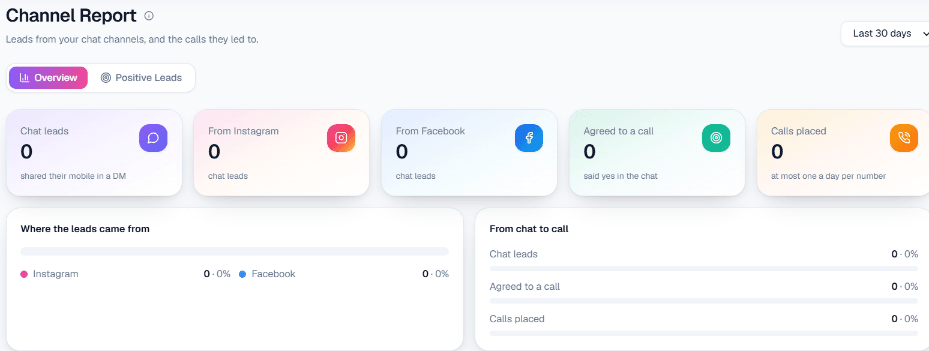
On Instagram and Facebook, the Positive Leads list shows where each chat lead got to: Asked to call, Agreed · call queued, Agreed · call not placed or Declined a call. The Channel Report counts how many customers shared a number, how many agreed and how many calls were placed.
An example: Instagram DM to call
Example
A home-interiors studio has Call when the customer agrees switched on for its Instagram account.
Customer: Hi, modular kitchen ka rough cost kitna aata hai?
AI: Hamare modular kitchen packages size aur material ke hisaab se alag hote hain. Aapka kitchen kitne feet ka hai?
Customer: Around 10 feet. My number is 98xxxxxx10.
AI: Thank you! Kya hamari team aapko abhi is number par call kar sakti hai, taaki measurements aur options samjha sakein?
Customer: Yes please.
An AI call goes out in Hinglish. Its opening context: customer wants a modular kitchen, about 10 feet, asked for a rough cost.
The other path: WhatsApp Keyword Auto-Call
WhatsApp has a second chat-to-call route that does not wait for consent in the chat. Keyword Auto-Call answers a matching message with a call rather than a text, and the customer's own words become the call's opening context. It is a premium feature switched on per workspace, with these controls:
- Up to five keywords or phrases per number, such as price, book or gold rate. A message matches only on a whole word, ignoring case, and a voice note never counts.
- Call instantly or after 1 to 30 seconds, so a burst of short messages becomes one call.
- A minimum gap of 1 to 6 hours and a daily cap of 1 to 10 calls per customer, default 1.
- A wallet check first: if the Live balance cannot cover it, the message is skipped with no charge. DND hours hold the call.
Keyword Auto-Call suits businesses where a certain word nearly always means "please call me"; intent-based calling asks first. Both count towards the same one-call-a-day limit, so a customer who triggered a keyword call is not rung again by the consent flow. The full picture is on the WhatsApp smart reply page.
Setting it up
- Connect the channel: a WhatsApp number by pairing code or QR, or an Instagram account or Facebook Page with Facebook Login.
- Choose the Business Details category the AI answers from.
- Switch on Call when the customer agrees and pick the call's purpose and language.
- Test it from your own phone in the Test workspace, which gets ₹100 of Test credit once the owner verifies their mobile, then go Live.
Your team can still read and reply to every chat in the live inbox. To pick a starting channel, read WhatsApp vs Instagram vs Facebook automation; for how chat leads are scored, see AI lead qualification.