
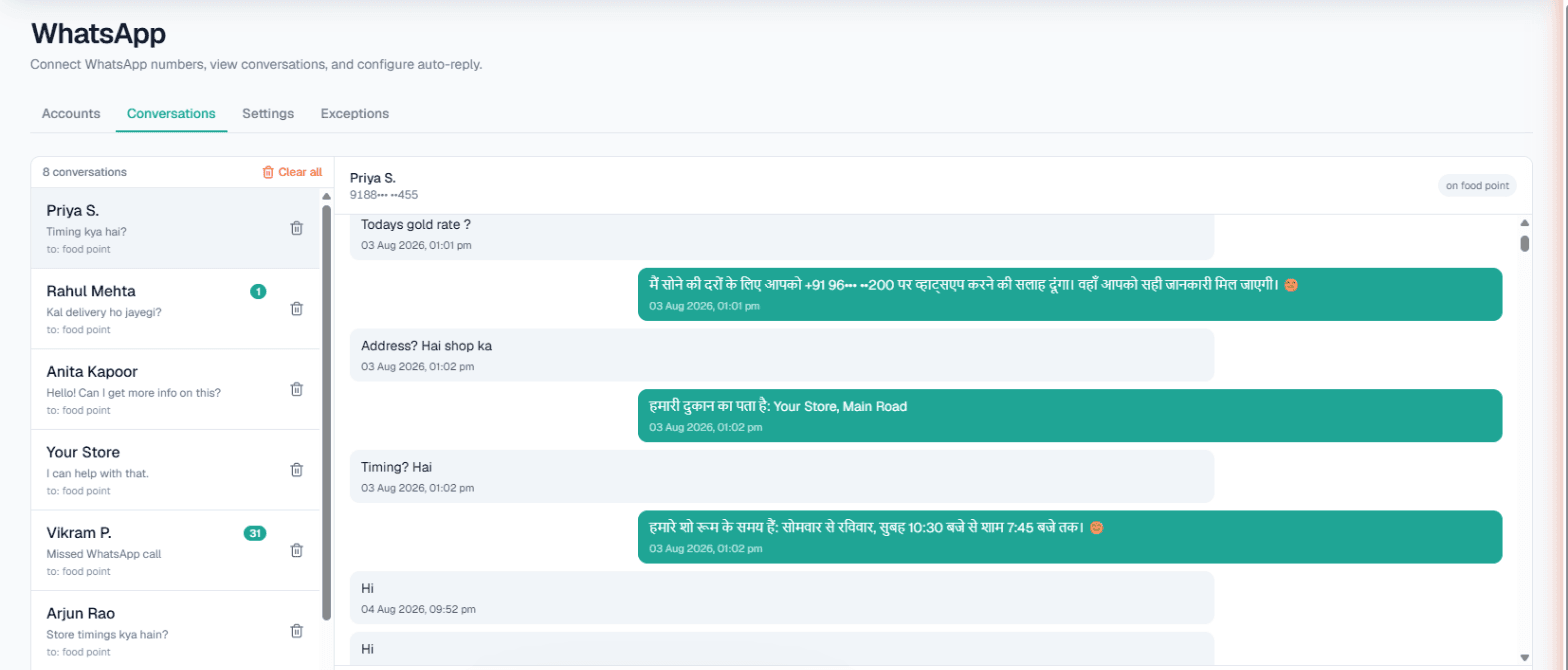
WhatsApp automation in Ludhiana means the shop's WhatsApp keeps answering dealers while the owner is at the godown or on the factory floor. MySA Business connects your existing WhatsApp number and lets an AI reply from the Business Details you wrote, in whatever language the dealer writes, Punjabi, Hindi, Hinglish or English. When a chat turns serious, it can also ring the dealer with an AI call, from a keyword you chose or after the dealer agrees to a call.
How dealer WhatsApp actually works in Ludhiana
Ludhiana is widely known for hosiery and knitwear, bicycles and cycle parts, and a large wholesale and retail trade around them. A typical wholesaler's WhatsApp is not a customer-service channel; it is the order book. Retailers send photos of a design and ask "eh kinne da?", distributors ask if a part number is in stock, and new shopkeepers from other towns ask for the price list.
Most of these messages need the same few answers. The trouble is that the person who knows them is also the one handling cash, dispatch and labour. Messages sent at 10 pm are answered at 11 am, by which time the retailer has ordered from someone else.
What you can switch on
You link your current number through WhatsApp's Linked Devices, by pairing code or QR. No new SIM. Then, per connected number:
- Smart reply (AI). Replies from that number's Business Details: your product lines, minimum order, dispatch days, payment terms. It does not invent a rate you did not give it. See WhatsApp Smart Reply.
- Custom auto-reply. A fixed message, if you would rather not use AI on a particular number.
- Missed-call auto-reply. When you miss a dealer's WhatsApp call, a text goes back so they are not left waiting.
- Keyword Auto-Call. A message containing a keyword you picked, such as "order" or "bulk", triggers an AI phone call to that dealer.
- Intent-based calling. The AI notices a chat about price, stock, a visit or a quote, and asks once whether your team may call. On a yes, an AI call goes out in the dealer's language with the chat summary as context. On a no, it does not ask again.
Full setup steps are in the WhatsApp docs.
Example: a cycle-parts retailer asks for a bulk rate
Example
Retailer (in Punjabi, Roman script): Bhaji, 26 inch rim di bulk order karni aa, 200 piece. Rate dasso te dispatch kado tak?
The message contains the keyword "bulk". The per-customer gap and daily cap allow a call, the Live wallet has balance, and it is outside DND hours, so an AI call goes out.
AI on the call: Sat Sri Akal ji. You just messaged about 200 pieces of 26-inch rims. Which colour and finish do you need, and to which city should we dispatch?
The retailer does not repeat the request; the call starts from what they wrote. The call's summary and recording land in your call log, so your sales person rings back with a firm price already knowing the quantity and city.
If a dealer instead types something like "price list bhejo, te koi call kar sakda?", intent-based calling handles it: the AI asks once and calls only after a yes.
Live rates and stock from your own system
Wholesale rates in yarn, steel or parts can change often, and a rate typed into Business Details goes stale. With Custom APIs enabled for your workspace, the Owner adds your API under Integrations → My APIs and ticks it under Live data in replies for the number. The AI then reads, for example, today's rate or the stock of an item before replying. On WhatsApp an API that needs the customer's mobile number can be used, which suits lookups like "my pending order".
The same API can feed your AI calls, either fetched before each outbound call or looked up during it. See Custom APIs.
Broadcasts, the inbox and exceptions
Broadcasts. To tell dealers about a new range or a holiday closure, send one approved WhatsApp template to a list, now or at a scheduled time. Opted-out numbers are skipped. This works through a connected provider (Meta WhatsApp or Automate Chats), is enabled per workspace and only the Owner can send it. Details: WhatsApp broadcasts.
Conversations inbox. Every chat, AI or not, shows up here, and your staff can reply by hand at any time.
Exceptions. Family, your own salesmen and old dealers who prefer the owner can be put on the exceptions list so the AI leaves them alone.
What works today, and the limits
| Works today | Limit to know |
|---|---|
| AI replies in the dealer's language | Replies only from your Business Details or live data |
| Missed-call text-back | WhatsApp calls only, and only from people who have messaged you before |
| Keyword Auto-Call | Gap and daily cap per customer; wallet and DND checks apply |
| Intent-based calling | Asks once; one chat-triggered call per number per day across WhatsApp, Instagram and Facebook |
| Broadcasts | Approved templates through a connected provider; Owner only |
| Shared inbox | No automatic hand-over to a person; your team picks up chats |
WhatsApp is switched on per workspace, with a limit on how many numbers can be connected.
Getting started
- Sign up, verify your mobile, and use the Test workspace with ₹100 of Test credit.
- Write Business Details as you would brief new counter staff: what you sell, minimum quantities, dispatch days, what not to promise.
- Connect your number and message it from another phone, once in Punjabi and once in Hinglish.
- Punjabi, Hindi and Hinglish can be chosen as the call language for Auto-Call. Press Try now or place a Test call and listen before switching calls on.
- Top up the prepaid Live wallet; there is no subscription. For the phone side of the business, read AI calling software in Ludhiana.