
Automated outbound calling software dials a list of customers for you and, in its AI form, also holds the conversation: an AI voice explains why it is calling, answers questions, qualifies interest and records the outcome, without an agent on every line. You upload a list or connect your lead source, set a purpose and a language, test it, and the calls go out at the pace and hours you choose.
This guide covers how it works, how AI outbound calls differ from a traditional auto dialer, how to run a first campaign, and what to watch.
Auto dialer vs AI outbound calling
Both start with a list. The difference is who talks when the customer picks up.
| Traditional auto dialer | AI outbound calling | |
|---|---|---|
| Who speaks to the customer | A human agent, once the call connects | An AI voice assistant |
| Limit on volume | How many agents are free | Your list, schedule and wallet |
| Consistency | Varies by agent and by hour | Same purpose and information on every call |
| After the call | Whatever the agent notes down | Recording, summary, sentiment and tags |
| Callbacks | Depends on the agent remembering | Scheduled at the time the customer asked |
An AI tool is not a replacement for every human call. It works best as an auto dialer alternative for the repetitive first conversation (confirming interest, answering basic questions, setting a visit or callback) so your team spends its time on the customers who are ready.
What automated outbound calling software is used for
- New lead calls. Someone fills a form or an ad; the AI calls them while they still remember you.
- Working an existing list. Old enquiries, past customers, renewals.
- Confirmations and reminders. An order, a delivery date, a visit, an event.
- Re-engagement. Customers who went quiet after asking for a price.
- Store events. For Shopify stores, the MySA Shopify app can trigger calls such as abandoned cart recovery.
How a bulk calling campaign works in MySA Business
A campaign dials a list with one purpose, one language and one caller ID, and gives you a report of every call. The full reference is in the campaigns documentation; here is the shape of it.
1. Choose how contacts arrive
- CSV Upload: a .csv or Excel .xlsx file up to 10 MB. Only the mobile number is required.
- Scheduled: one file called over several days: split a long list into a fixed number per day, call the whole list again on dates you pick, or repeat every few days.
- API: your CRM or app pushes contacts into the campaign.
- Single Call: one or a handful of numbers typed in by hand.
- Webhook: new website-form or ad leads are dialled within about a minute, with a cap on calls per customer per day and a minimum gap between calls. See webhook campaigns.
2. Write the purpose and pick the language
The purpose is what the call should achieve, in plain language. You can personalise it per contact with columns var1 to var15 in your file: a purpose that says "Aapka order {var1} taiyaar hai" is spoken with each customer's own order number. A language column can override the campaign language for one contact.
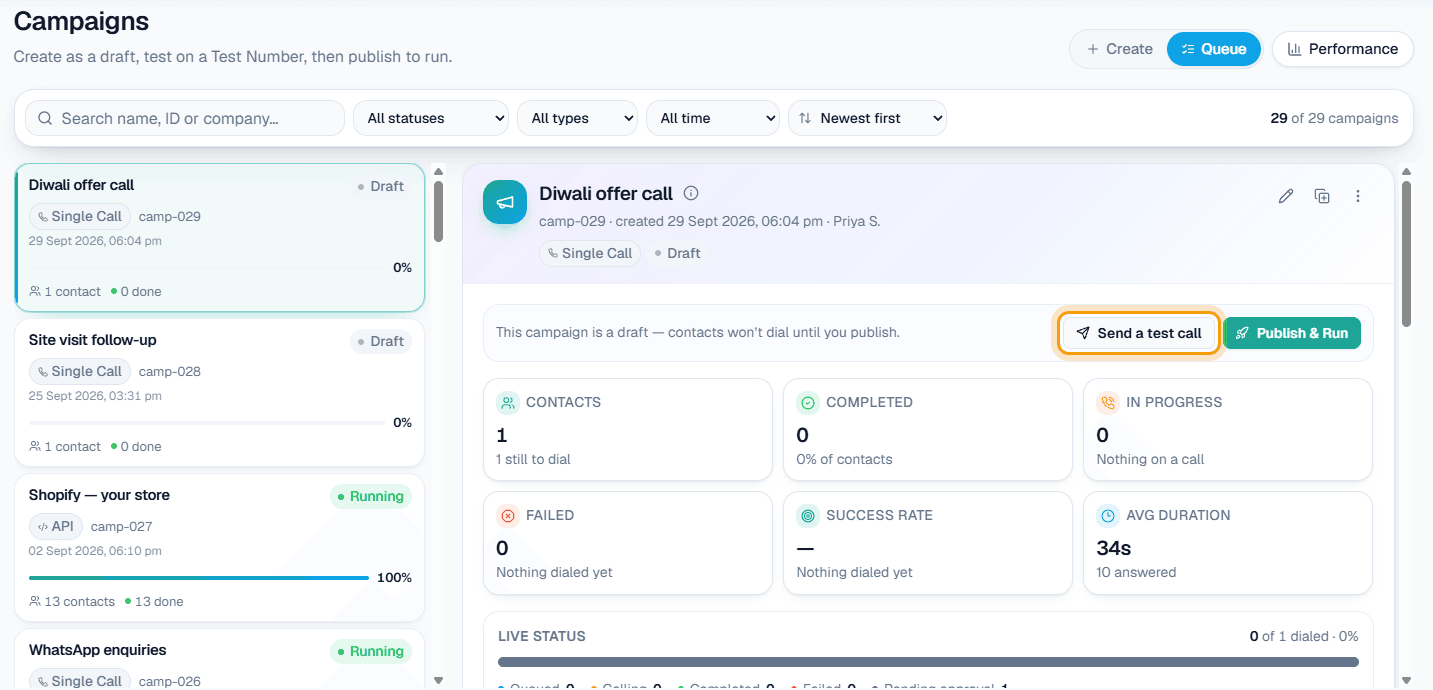
3. Send a test call
From the draft, send a test call to your own phone using the campaign's exact settings. Add a customer query if you want to hear how it handles a particular question.
4. Publish and control
Publish & Run starts dialling at your start time. While it runs you can pause, resume or stop; calls already in progress always finish. If your workspace requires approval, an Owner or Admin approves the campaign first.
Pacing, quiet hours and the customer's patience
Bulk calling software can do damage if it is careless. Three controls matter:
- DND hours. Calls are not placed inside your DND window; they are held, not lost.
- Scheduled spreading. A Scheduled campaign only starts runs between 9:00 AM and 9:00 PM IST, and "skip people already reached" leaves out anyone who spoke on an earlier round.
- Webhook limits. Max calls to one customer per day (default 2) and a minimum gap between calls of at least an hour.
And one rule outside the software: make sure you have the customer's permission to call.
What happens after the calls
Each call leaves a recording, an AI summary, sentiment and tags. Campaign analytics shows how every campaign is doing, with a report download per campaign. Customers who asked to be called later land in follow-ups and get a call at the time they asked. Calls that did their job become Positive Leads, deliverable by email, Google Sheet, webhook or API.
If a customer asks for a person, call transfer can connect them to your team on the same call, with transfer minutes billed separately.
Cost of AI outbound calls
Calls come from a prepaid wallet with no subscription. Calls of 10 seconds or less are free, so an unanswered or instantly cut call costs nothing; longer calls are billed per started minute at your workspace's rate, shown in the console. If the wallet is short when a call comes up, it waits ten minutes for a top-up and is then cancelled rather than dialled later. For volume pricing, contact sales.
A first-campaign checklist
- Write Business Details that answer the top ten questions.
- Start with a small list of a few dozen contacts, not your whole database.
- Run test calls in the language you will use.
- Set DND hours before you publish.
- Read the summaries of the first batch and adjust the purpose.
- Only then scale up, or move to a Scheduled campaign for long lists.
For comparing tools, see how to choose AI calling software. For what the AI does on each call, see AI voice agent for business.