
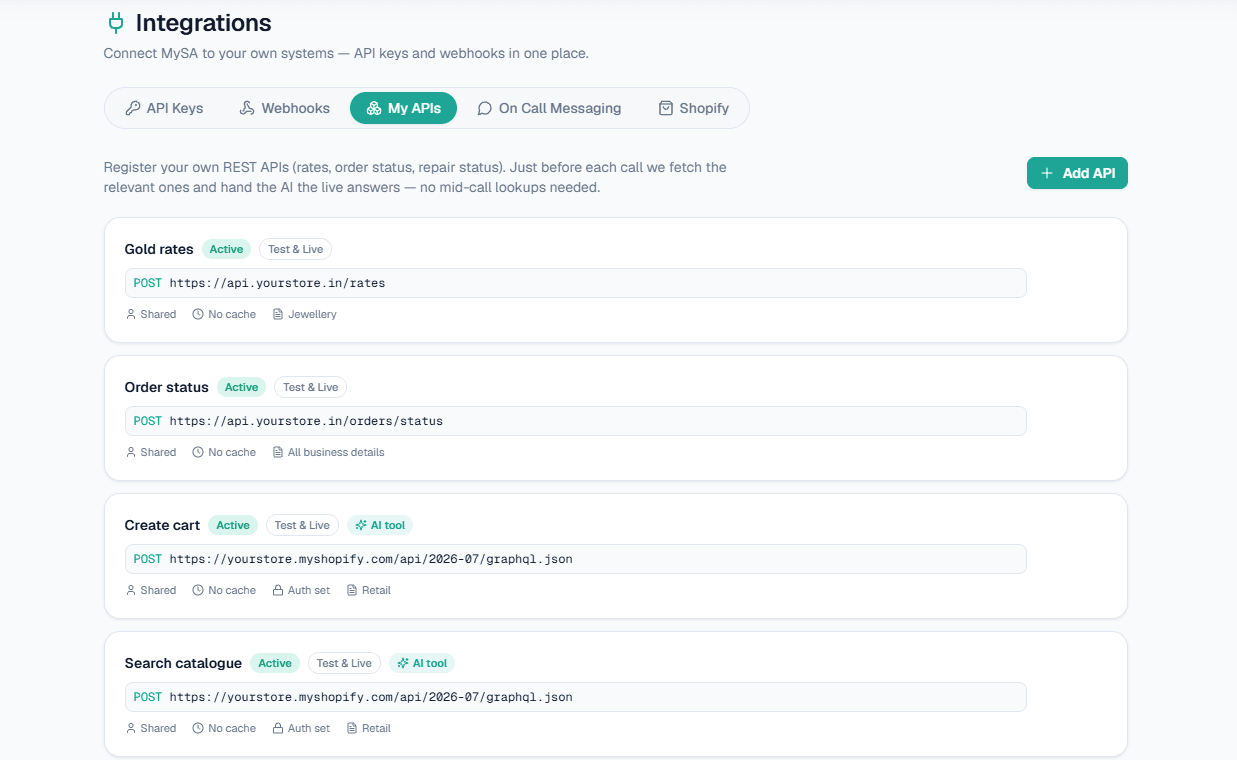
AI calls with real-time data are calls where the voice assistant reads live answers from your own system, such as today's gold rate, an order's status or what is in stock, instead of relying on information typed in last week. In MySA Business this is done with Custom APIs: you register your own API once, and it is either fetched just before each outbound call or called by the AI in the middle of a call when the customer mentions something it needs to look up.
This guide explains both modes, what kind of data suits each, what happens when your API is slow, and how the same data reaches your WhatsApp, Instagram and Facebook replies.
Why static knowledge is not enough
The AI on a MySA call answers only from the Business Details you approved. That is what stops it inventing prices or policies. But some answers change every day, or are different for every customer:
- A jeweller's rate for 22K gold changes daily.
- An online store's customer wants to know where order 8842 is.
- A distributor's buyer asks whether a product is in stock today.
Typing these into Business Details every morning does not work, and per-customer details never belong there. The answer has to come from the system that already knows it: your ERP, POS, order system or a simple sheet behind an API.
Two ways to put live data in AI calls
| Mode | When your API is called | Good for |
|---|---|---|
| Pre-fetch (default) | Just before each outbound call; the answers are handed to the AI as facts | Data known before dialling: today's rate, this customer's open order |
| During the call | When the AI decides it needs it, using a detail the customer just said | Lookups nobody can predict: "and what about order 8842?" |
A pre-fetch can only answer what was known before dialling. A during-the-call lookup can answer about something the customer only just mentioned. Your workspace runs one of the two modes at a time; to change it, raise a support ticket.
During-the-call mode is enabled per business and off by default, partly because your API's credential is sent to the calling gateway, which makes the request.
Three examples
Example: gold rate, pre-fetch
A jeweller runs a campaign inviting past customers to a festive collection. Before each call, MySA fetches today's rates.
Customer: Aaj 22 carat ka rate kya chal raha hai?
AI: Aaj 22K gold ka rate [aapki API se aaj ka rate] per gram hai, aur silver [aaj ka rate] per gram.
Example: order status, during the call
Customer: Mera ek aur order tha, number 8842, wo kab aayega?
The AI calls the store's order API with 8842 and reads back the status it returns.
Example: stock
A distributor's API returns today's stock per product. A shared answer like this can be cached, so every caller that day gets it without hitting the API again.
The rates above are illustrative, from the sample in the documentation, not a real quote.
What the AI actually sees
You stay in control of what reaches the AI. When you add an API, you fetch a live sample, tick the fields you want, and write a short message template such as {GroupName}: ₹{SalesRate}/gram. Fields you do not reference in the template are dropped, so the AI only ever sees the lines your template produces. Optionally, AI-format this data rewrites the lines into clean facts with the numbers kept exact, at the cost of a small delay.
For during-the-call mode you also write one line on when the AI should call this API, up to 500 characters. This line is the only thing the AI reads to decide whether the API is relevant, so be specific: "Look up the live status of a customer's order. Use it when the customer asks where their order is and gives an order number." A vague line like "order details" means the AI either never calls it or calls it every time.
When your API is slow or down
An API failure never stops a call. If a request times out, errors or is blocked, it is left out and the call goes ahead without it.
| Setting | Value |
|---|---|
| Pre-fetch timeout | 2.5 seconds per request; all active APIs are fetched in parallel |
| During-the-call timeout | 8 seconds by default, 1 to 30 seconds per API |
| Cache | 0 to 86400 seconds; 0 means always fresh |
With caching on, MySA falls back to the last good answer if your API does not respond. Shared data, such as a rate, is cached per API per day; customer-specific data is cached per mobile number only for as long as you set. A good rule: cache rates and menus, keep order status at 0.
Live data in WhatsApp, Instagram and Facebook replies
The same APIs serve your chats. On a WhatsApp number, an Instagram account or a Facebook Page, tick the APIs you want under Live data in replies, and the AI reads today's rate, an order status or stock before it answers a message. One exception: an API that needs the customer's mobile number is skipped in Instagram and Facebook DMs, so keep customer-specific lookups for WhatsApp and calls. More on the WhatsApp smart reply page.
Setting up an AI voice agent API integration
Custom APIs are enabled per workspace. Once enabled, the workspace Owner finds them under Integrations → My APIs:
- Click Add API and enter a name, the URL, the method (GET or POST) and whether it runs in Test, Live or both.
- Choose authentication: none, a custom header with a secret, or a bearer token. Secrets are stored encrypted and never shown again.
- Write the payload using tokens MySA fills in, such as the customer's 10-digit mobile or today's date, and tick Customer-specific if the answer depends on the customer.
- Click Fetch sample, pick the fields and adjust the message template.
- Set it Active and save. Only active APIs are used.
Your API must be reachable from MySA's servers; if it sits behind a firewall, whitelist MySA's IP. The step-by-step reference is in the Custom APIs documentation, and the overview is on the Custom APIs feature page.
Live data works with the rest of the calling setup: outbound campaigns for lists, and the assistants described on AI voice agents. If you are still comparing tools, live-data support is one of the points in how to choose AI calling software.