
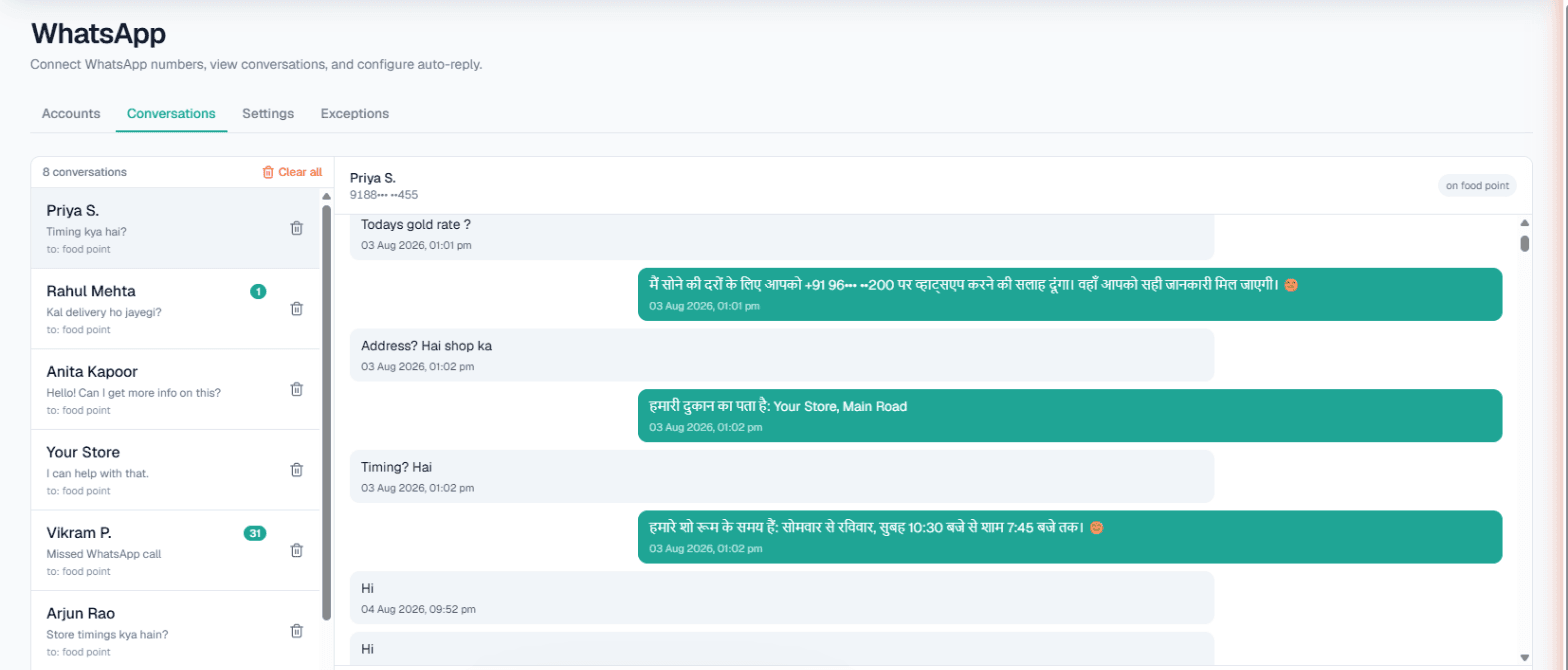
WhatsApp automation in Ahmedabad works best as a first responder, not a replacement for the owner: an AI answers routine chats on your business number in Gujarati, Hindi or English from the details you approved, while you or your staff step into any conversation from a shared inbox, and the numbers you deal with personally are kept out of it entirely. For a namkeen maker, a tiles dealer or a CA firm, that split matters.
Why the owner still wants the last word
Many Ahmedabad businesses are owner-run and relationship-driven. A regular dealer expects the seth to answer, not a bot. A bulk buyer expects to negotiate. At the same time, the same number gets dozens of plain questions a day: price list, timings, delivery to Gandhinagar, GST invoice or not.
So the right set-up has three parts: the AI answers the plain questions, the Conversations inbox lets a person take any chat at any moment, and the Exceptions list keeps the relationship numbers away from automation altogether.
What is available on each number
Your existing number is linked through WhatsApp's Linked Devices, by pairing code or QR. Then per number:
- Smart reply (AI): answers from that number's Business Details, in the customer's language; it does not invent rates or discounts.
- Custom auto-reply: a fixed message for numbers where you prefer no AI.
- Missed-call auto-reply: a text, and optionally an AI voice callback, to WhatsApp callers you missed who have messaged you before. Choose Only outside working hours to keep daytime calls ringing your phone.
- Keyword Auto-Call: a message with a keyword like bulk order triggers an AI call.
- Intent-based calling (Call when the customer agrees): the AI offers a call once when a chat shows buying interest, and calls in the customer's language with a chat summary on a yes.
See WhatsApp Smart Reply for the overview.
Exceptions and the inbox, in practice
- Each connected number has its own Exceptions list of up to twenty numbers. Add them one by one, upload a CSV, or Copy from another number.
- Excepted numbers get no automatic replies, no Auto-Call and no missed-call text or callback, and their WhatsApp calls ring through to you. Their messages still appear in the inbox.
- In Conversations, anyone on your team opens a chat and types a reply. The AI does not hand chats over by itself, so decide who checks the inbox and when.
Steps and screenshots are in the WhatsApp docs.
Ahmedabad business types that fit
Scenarios:
- Namkeen, farsan and sweet makers. Retail customers ask about packs and prices; corporate buyers ask about Diwali gift boxes in bulk, which the owner prefers to quote personally.
- Tiles, sanitaryware and hardware dealers. Contractors ask for sizes and finishes. Stock or today's rate from your own software can feed replies through an API.
- CA and tax consultants. Document lists for returns, deadlines you have noted, consultation timings. Business hours only keeps replies to 9 am to 9 pm.
- Tuition classes. Batch timings and fees for school students, with Today's update for "Saturday doubt-clearing session at 4 pm".
Example: a bulk gift-box enquiry in Gujarati
Example
Customer (writes in Gujarati): We need 200 Diwali gift boxes for our office staff. What boxes do you have, and what would the price be?
AI (replies in Gujarati, shown here in English): We have three gift-box options, with the contents and per-box prices in our current Diwali list. For orders of this size, our owner will share the final rate personally. Would you like our team to call you?
Customer: Ask him to message me here.
The owner sees the chat in Conversations a few minutes later and types the bulk quote himself.
The AI handled the box options from Business Details, offered a call once, and when the customer preferred chat, the person who sets bulk prices took over in the same thread. Their regular distributor's number, on the Exceptions list, never got an automatic reply in the first place.
Live data and broadcasts
Live data. The Owner can add your own API under Integrations → My APIs, once Custom APIs are enabled for the workspace, and tick it under Live data in replies. On calls, the same API is read just before each outbound call or during the call when the customer mentions something; one mode per workspace, and a failed API never stops a call. See Custom APIs.
Broadcasts. To share a new Diwali catalogue, send one approved template to a campaign list or CSV, now or scheduled up to 30 days ahead, with opted-out numbers left out. It goes through Meta WhatsApp or Automate Chats and is Owner-only. See WhatsApp broadcasts.
Limits and honest gaps
| Area | What to expect |
|---|---|
| Exceptions | Twenty numbers per connected number |
| Hand-over | Manual, from the inbox; never automatic |
| Keyword Auto-Call | Five keywords; 1–6 hours apart; 1–10 a day per customer |
| Chat-started calls | One a day per number across WhatsApp, Instagram and Facebook |
| Voice notes | Not heard; a fallback message is sent |
| Wallet at zero | Number disconnects after 24 hours at zero; history is kept |
Calls hold during your DND hours. For calling dealers with today's rate, read AI calling software in Ahmedabad.
Getting started
- Sign up and verify your mobile number; the Test workspace has ₹100 of Test credit.
- Write Business Details: products, pack sizes, price lists you share publicly, delivery areas.
- Add your relationship numbers to Exceptions before switching on Smart reply.
- Gujarati can be chosen as the call language. Hear it on a free Test call first.
- Top up the prepaid Live wallet; there is no subscription.