
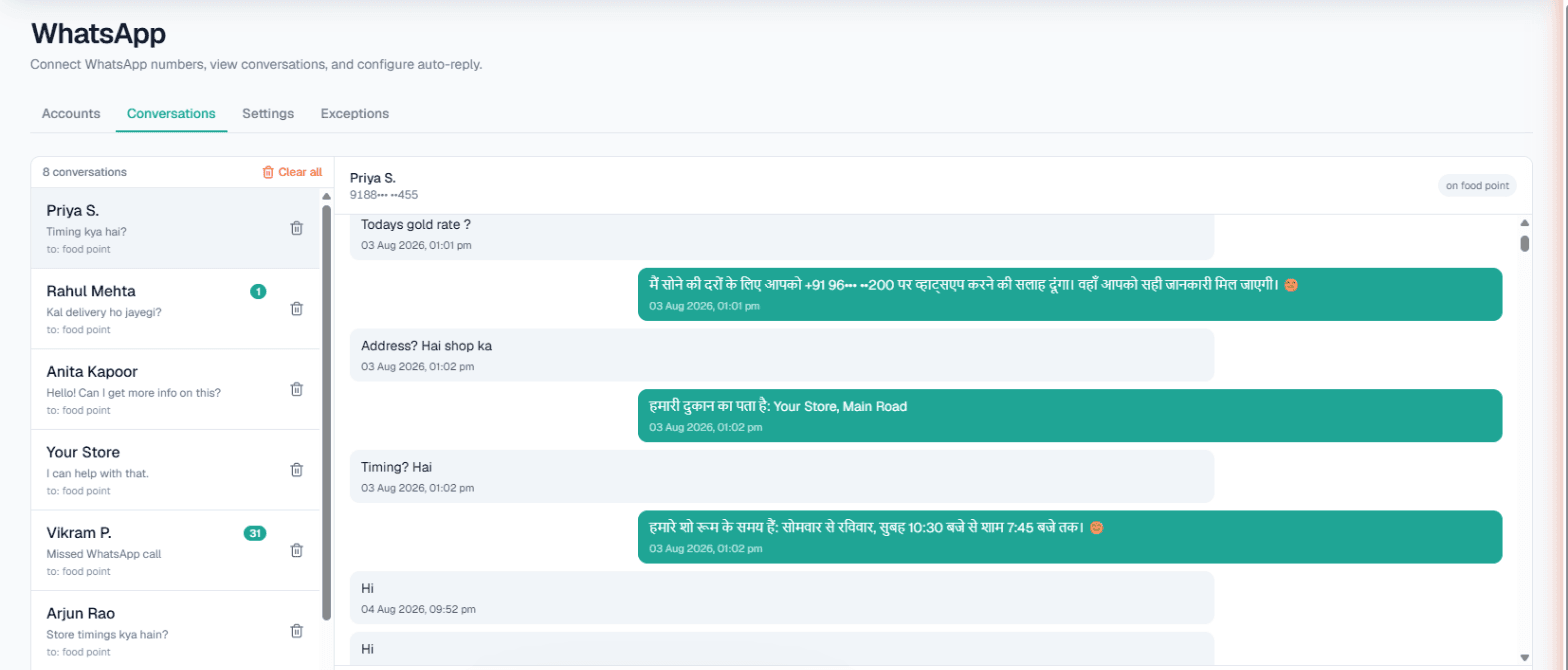
WhatsApp automation in Hyderabad gives your business number an assistant that never sleeps: it answers chats from your approved Business Details in Telugu, Urdu, English or Hinglish, texts back WhatsApp calls you could not take, and can ring a customer back with an AI voice call. For a study-abroad consultancy, an interior studio or a plotted-layout project, that means the late-night caller hears from you before they try the next office.
Missed WhatsApp calls are the quiet leak
Many customers in Hyderabad do not type first; they tap the call button inside WhatsApp. Students ring consultants after college, home-buyers ring after work, and a lot of those calls land when your counsellor is with someone else or the office is shut. A missed WhatsApp call leaves no voicemail. Unless someone notices and calls back, the enquiry quietly goes elsewhere.
The AI cannot pick up a WhatsApp call itself, but it can make sure nobody who called is left waiting, which is where most of the value sits for these businesses.
What the assistant does on your number
Link the number you already use through WhatsApp's Linked Devices screen, by pairing code or QR. Then, per number:
- Missed-call auto-reply. The call is declined politely and followed by your text, an AI voice callback, or both. The callback has its own language, purpose, maximum length, cooldown and daily limit. Tick Only outside working hours and daytime calls still ring your phone.
- Smart reply (AI). Each message answered from that number's Business Details, in the customer's language.
- Custom auto-reply. A fixed message when you would rather not use the AI.
- Keyword Auto-Call. A message with your keyword, perhaps callback or counselling, is answered with an AI call.
- Intent-based calling. In the console it is Call when the customer agrees: when a chat shows real interest, the AI asks once if your team may call, and on a yes calls in the customer's language with a chat summary.
Setup steps are in the WhatsApp documentation.
Hyderabad businesses where this helps
These are scenarios:
- Study-abroad and admission consultants. Questions on countries, intakes, test scores and fees, often from parents. What this number should do can ask every chat for the course and target intake.
- Interior studios and furniture showrooms. "2BHK full interior kitna hoga?" is answered with the ranges you list, and an interested buyer is offered a call to fix a site measurement.
- Plotted layouts and villa projects. Location, approvals you have listed, site-visit days. Today's update can say "site visits this Sunday 10 am to 4 pm".
- Pearl and jewellery counters. Designs, timings and whether a piece can be reserved; your staff take the bargaining from the inbox.
Example: a missed call at 10:40 pm
Example
A student who asked about Germany in a chat last week rings the consultancy on WhatsApp at 10:40 pm. Nobody can take it.
Text sent straight after (the auto-reply message you wrote): Sorry we missed your call. Our counsellors are available 10 am to 7 pm, and we will call you back shortly.
AI voice callback, in the language set for callbacks: Hello, you called us a few minutes ago. Are you still looking at a Master's in Germany for next year's intake? I can note your course and a good time for a counsellor to call.
The callback is a real AI call billed at your call rate. It reaches the student only because they had messaged before; WhatsApp hides the number of a first-time caller, so that call is declined but cannot be returned. Calls also respect your DND hours.
Live data, inbox, exceptions and broadcasts
- Live data in replies. Things that change, such as seats left in a batch or which plots are still available, can come from your own API. The Owner sets it up under Integrations → My APIs (enabled per workspace) and ticks it per number. On calls, the same API is read either before dialling or mid-call when the customer mentions something; one mode at a time, and a failed API never stops a call. See Custom APIs.
- Conversations. Every chat in one inbox, where counsellors and sales staff reply by hand at any time. Nothing is handed over automatically.
- Exceptions. Partner universities' contacts, your agents and family stay off automation; their calls ring through.
- Broadcasts. Before an intake deadline, one approved template can go to a list, now or scheduled, leaving out anyone who opted out. It needs Meta WhatsApp or Automate Chats connected and is Owner-only. See WhatsApp broadcasts.
Limits to plan around
| Feature | Limit |
|---|---|
| Missed-call text and callback | Only callers who messaged you before |
| AI voice callback | Own cooldown and daily limit per number |
| Keyword Auto-Call | Five keywords; 1–6 hours apart; 1–10 a day per customer |
| Chat-started calls | One a day per number across WhatsApp, Instagram and Facebook |
| Exceptions | Twenty numbers per connected number |
| Wallet at zero | A number is disconnected after 24 hours at zero balance |
To have the AI answer your regular phone line and book slots on the call, see AI calling software in Hyderabad.
Getting started
- Sign up and verify your mobile; the separate Test workspace carries ₹100 of Test credit.
- Write Business Details: services, fee ranges, timings, documents needed.
- Connect the number and call it on WhatsApp from another phone that has messaged it, to see the text-back.
- Telugu, Urdu or Hindi can be chosen as the call language for the callback. Hear it first with Try now or a Test call.
- Top up the Live wallet; billing is prepaid, with no subscription.