
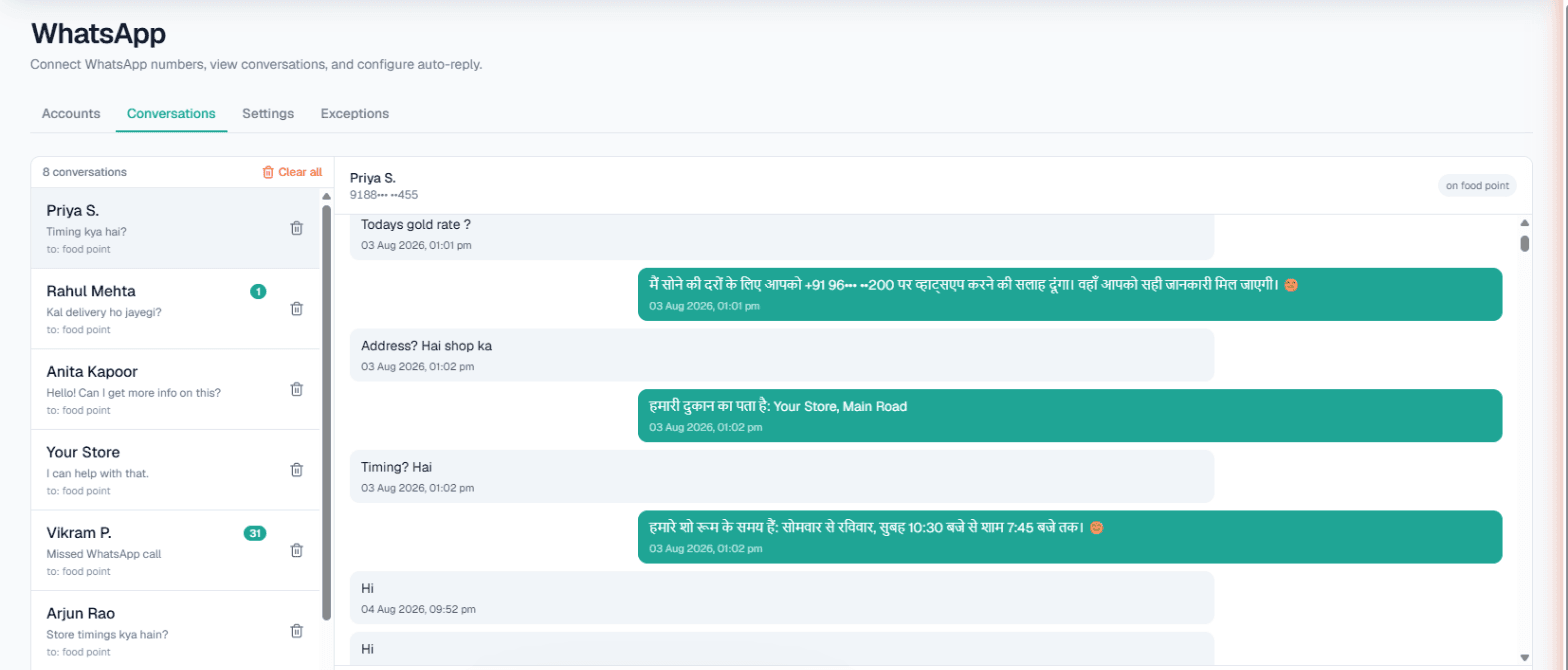
WhatsApp automation in Mumbai means your business number keeps answering while you are busy, travelling or closed: an AI replies to each customer from the details you approved, in the language they write in, and when a chat turns into a real order it asks whether your team may call. A tiffin service, a salon or a travel agent gets the same thing out of it: fewer customers lost to slow replies, and a phone call only when the customer wants one.
Why Mumbai customers expect a fast reply
People here message from a train, a cab or a queue, and they message several businesses at once. A family looking for a daily tiffin asks three kitchens near their building; whoever answers clearly first usually gets the order. The questions repeat: menu, price per month, delivery area, trial meal. That is exactly what an AI can answer from your Business Details without inventing anything.
What it should not do is push every enquiry into a call. The sensible pattern is to answer in the chat and call only the people who ask for it, which is how the features below are built.
The building blocks
Connect your existing number through WhatsApp's Linked Devices with a pairing code or QR scan, and you can switch on, per number:
- Smart reply (AI) from that number's Business Details, in the customer's language, Hinglish included.
- Custom auto-reply, a fixed message for when the AI is switched off.
- Missed-call auto-reply: the AI cannot take a WhatsApp call, so it texts the caller back and, if you choose, places an AI voice callback. You can limit this to outside working hours.
- Keyword Auto-Call: a message with a keyword you picked, such as booking, is answered with an AI phone call.
- Intent-based calling, shown in the console as Call when the customer agrees.
Settings for each are in the WhatsApp docs.
Where it fits in Mumbai
Think of these as scenarios:
- Tiffin services and home kitchens. Monthly plans, veg or non-veg, which areas you deliver to, when a trial can start.
- Salons and beauty studios. Service menus, bridal packages, which stylist is in on Sunday. With Appointments set up, a slot booked on an AI call is confirmed to the customer on WhatsApp, with a reminder three hours before.
- Travel agents. Package questions arrive in the evening after work. Today's update can carry a note like "Goa long-weekend dates filling fast".
- Wholesale garment and fabric sellers. Retailers ask for minimum quantities and dispatch days; your team can answer the price-sensitive ones by hand from the inbox.
Example: intent-based calling for a tiffin service
Example
Customer: Hi, Andheri East me lunch tiffin milega? Monthly kitna hai?
AI: Haan, Andheri East me hum deliver karte hain. Monthly lunch plan veg aur non-veg dono me hai, price hamari current list ke hisaab se. Trial meal bhi le sakte hain. Kya hamari team aapko call karke plan fix kar de?
Customer: Haan, call kar do.
An AI call goes out in Hinglish, opening with what the customer already asked, and confirms the start date and address.
This is intent-based calling. The AI reads the chat for buying signs, here price and delivery, and asks once. If the customer had replied "abhi nahi", the chat would simply continue and the question would not come back. At most one chat-started call a day reaches the same number across WhatsApp, Instagram and Facebook, and calls wait out your DND hours. If the customer writes in Marathi, the reply is in Marathi.
Live data, team inbox and broadcasts
- Live data in replies. If a figure changes daily, such as a package's seats left or today's special, the Owner can connect your own API under Integrations → My APIs and tick it for the number, so replies use today's value. On calls the same APIs can be read before dialling or during the conversation, one mode per workspace, and a failed API never stops a call. See Custom APIs.
- Conversations inbox. Your staff read every chat and can type a reply whenever they want; the AI does not hand chats over by itself.
- Exceptions. Family, suppliers and delivery staff go here, so they never get automatic replies.
- Broadcasts. To tell past customers about a new monthly menu, send one approved template to a list, now or at a scheduled time, with opt-outs left out. It needs a provider (Meta WhatsApp or Automate Chats) and is for the Owner only. See WhatsApp broadcasts.
Limits at a glance
| What | Limit |
|---|---|
| Reply wait to merge messages | Up to 30 seconds (3 by default) |
| AI reply hours, if restricted | 9 am to 9 pm |
| Calls per customer from Auto-Call | 1–10 a day (default 1), 1–6 hours apart |
| Chat-started calls per number | One a day across all three chat channels |
| Missed-call text-back | Only callers who have messaged you before |
| Broadcast list from CSV | Up to 50,000 rows, scheduled up to 30 days ahead |
For the phone side, including callbacks at the time a customer asked for, see AI calling software in Mumbai.
Getting started
- Create your workspace and verify your mobile number; the Test environment gets ₹100 of Test credit.
- Fill in Business Details: menu or services, prices, delivery areas, timings.
- Connect the number, switch on Smart reply and send it a Hinglish and a Marathi message from another phone.
- Turn on Call when the customer agrees and try the flow yourself.
- Marathi or Hindi can be chosen as the call language; hear it on a free Test call before going Live with a prepaid wallet.