
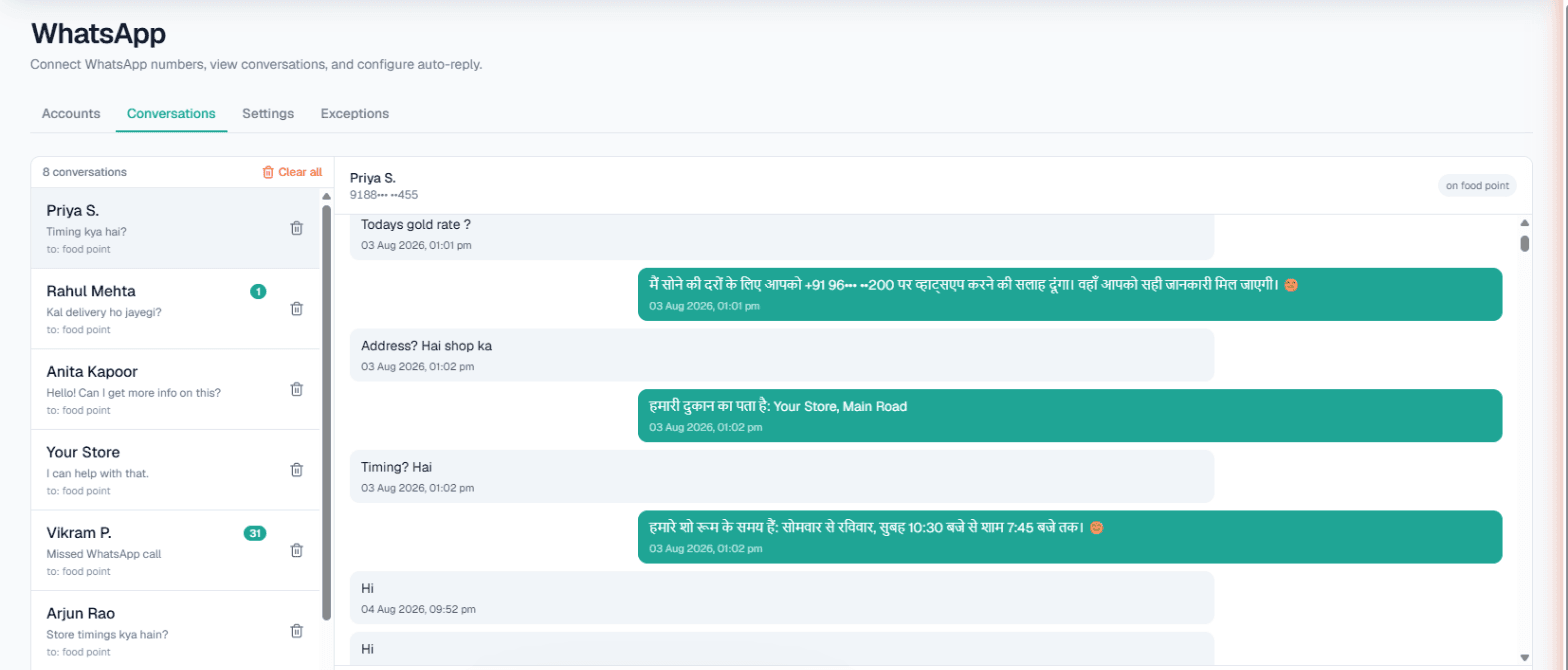
WhatsApp automation in Pune helps a neighbourhood business do two things at once: answer every incoming chat in Marathi, Hindi or English from the details you approved, and reach past customers with an approved WhatsApp message when there is something worth telling them. A bakery, a two-wheeler garage or a flat-rental broker gets quick replies on the busy days and a clean way to announce festival orders, with opt-outs respected.
Two jobs: answer and announce
Pune's local businesses live on repeat customers. The cake shop that did a birthday last year wants that family back for Ganeshotsav and Diwali orders. The garage wants riders back when a service is due. Those same customers then message with questions: flavours and sizes, pick-up time, whether a bike can be dropped tomorrow.
Answering is what smart reply is for. Announcing is what broadcasts are for. They work differently, and it helps to know which is which.
Answering: what runs on your number
Link the number you already use, by pairing code or QR, through WhatsApp's Linked Devices. Per number you can turn on:
- Smart reply (AI), answering from that number's Business Details in the language the customer writes, so a Marathi question gets a Marathi answer.
- Custom auto-reply, a fixed text if you prefer no AI on that number.
- Missed-call auto-reply, texting back WhatsApp callers you missed, with an optional AI voice callback. Only people who have messaged you before can be reached.
- Keyword Auto-Call, where a message with your keyword, say pickup, starts an AI call.
- Intent-based calling (Call when the customer agrees): when a chat shows a real order or visit, the AI asks once whether your team may call; on a yes, the call goes out in their language with the chat summary.
Wait after last message (3 seconds by default, up to 30) lets a customer finish typing before the AI replies once. The full guide is in the WhatsApp docs.
Announcing: broadcasts, done carefully
WhatsApp broadcasts send one approved WhatsApp template to a list. That is a separate setup from the linked number: it goes through a provider you connect (Meta WhatsApp or Automate Chats), it is visible to the Owner only, and it is enabled per workspace.
- Audience: a campaign's call list, or a CSV of up to 50,000 rows. Numbers without a country code are read as Indian.
- Message: fill the template's slots from the contact's name, your business details, fixed text, or one of your own APIs.
- Schedule: send now, or pick a time up to 30 days ahead in India time.
- Opt-outs: numbers on the Opted out list are skipped on every future broadcast, and Review shows how many were left out.
- Pace: to start, up to 1,000 different people in any rolling 24 hours; the rest continue as the limit frees up.
Pune business types that fit
Scenarios:
- Bakeries and cake shops. Flavours, eggless options, sizes and pick-up slots in chat; a festival menu by broadcast.
- Two-wheeler service garages. "Can I drop the bike tomorrow?" Keyword Auto-Call can ring the rider to agree a time.
- Flat-rental brokers. Students and working professionals ask about areas, deposit and furnishing. Intent-based calling offers a call when someone wants a viewing.
- Hobby and language classes. Batch days and fees, with Today's update for "Saturday batch full, Sunday has seats".
Example: a cake order in Marathi, then a festival broadcast
Example
Customer (writes in Marathi): Do you make eggless chocolate cakes? I need one kilo for Saturday evening.
AI (replies in Marathi, shown here in English): Yes, we make eggless chocolate cakes, and a one-kilo cake can be ready for Saturday at the price on our current menu. Pick-up is from 11 am to 9 pm. Shall our team call you to confirm the message on the cake?
Customer: Yes.
An AI call follows in Marathi with a summary of the chat.
A month later, the owner broadcasts an approved "Diwali sweets and cakes, pre-order now" template to a CSV of past customers. Three people who had asked not to be messaged are on the opt-out list and are skipped; Review shows the count before anything is sent.
Live data, inbox and limits
If prices or availability change daily, the Owner can add your own API under Integrations → My APIs and tick it under Live data in replies. On calls the API is read before each call or during it, one mode per workspace, and a failed API never stops a call; see Custom APIs. Every chat is in the Conversations inbox for your staff to answer by hand, and the Exceptions list keeps family and suppliers away from the AI.
| Setting | Limit |
|---|---|
| Keyword Auto-Call | Five keywords per number; 1–6 hours apart; 1–10 calls a day per customer |
| Chat-started calls | One a day per number across WhatsApp, Instagram and Facebook |
| AI replies | Round the clock, or 9 am to 9 pm with Business hours only |
| Broadcast audience | CSV up to 50,000 rows; scheduled up to 30 days ahead |
| Broadcast pace | Starts at 1,000 people per rolling 24 hours |
AI calls also hold during your DND hours. To call admission or renewal lists in waves, see AI calling software in Pune.
Getting started
- Sign up and verify your mobile number to get the Test workspace's ₹100 of Test credit.
- Write Business Details: products, price ranges, timings, pick-up and delivery rules.
- Connect the number and send a Marathi message from another phone.
- Marathi can be chosen as the call language. Hear it on a free Test call first.
- Top up the Live wallet, prepaid with no subscription, and set up broadcasts if your workspace has them.