
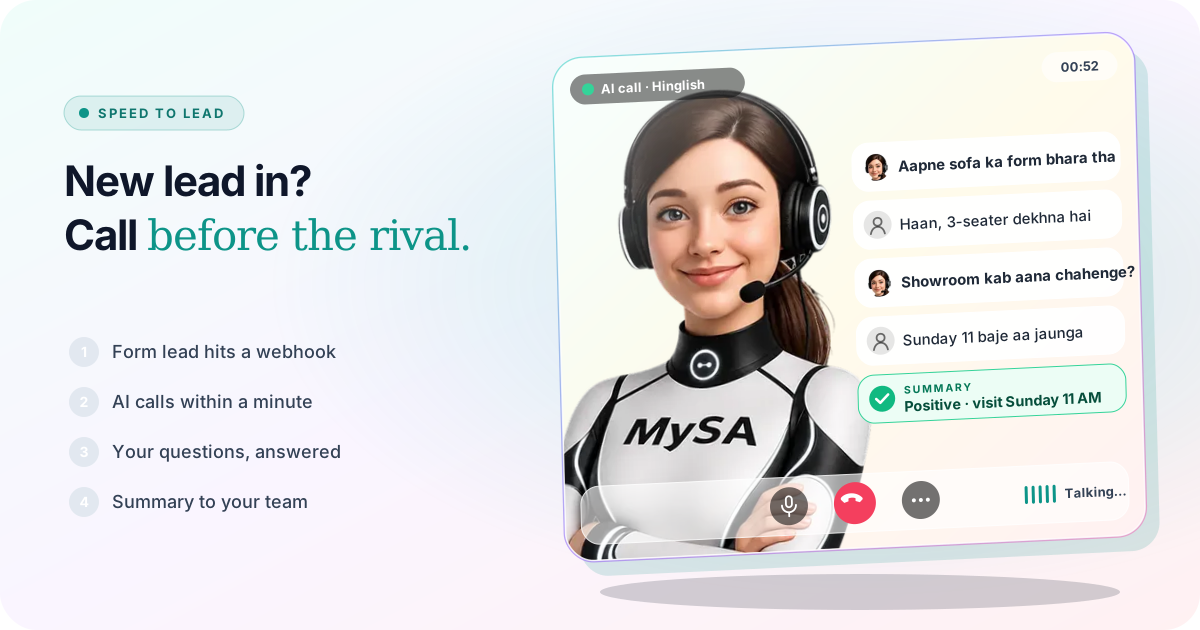
Speed to lead is the time between a customer sending an enquiry and your business calling them back. The shorter that gap, the more likely you are to reach the customer while they still care, and before someone else does. MySA Business shortens it by having an AI voice assistant call each new lead from your website form, ad leads or Justdial automatically, usually within about a minute, ask your questions, and hand your team a summary.
Formula 1 makes the same point every race weekend. At the Mexico City Grand Prix in November 2026, Mercedes driver Kimi Antonelli finished third and became the youngest world champion in Formula 1 history, at 20, while Max Verstappen won the race. Pit stops in that sport take only a few seconds, and races are still won and lost in them. A new lead works the same way: most of the effort, the ad spend and the brand, goes in before the enquiry arrives, and the first minute after it decides who gets the conversation.
Why the first call decides who wins the lead
A customer who has just filled a form is still holding their phone. They remember your ad, they know what they wanted, and they will usually pick up. An hour later they are in a meeting, cooking dinner, or already talking to the shop that called first.
Slow speed to lead rarely comes from a lazy team. It comes from how enquiries arrive:
- Leads come in bursts. An ad starts delivering, and twenty forms land in half an hour.
- Leads come at odd hours. After dinner, on Sunday afternoon, during the cricket or the Grand Prix.
- Leads come from many places. The website form, Facebook Lead Ads, Justdial, WhatsApp, Instagram DMs. Each one sits in a different inbox.
- The person who calls is also doing other work. Billing, the showroom floor, a site visit.
The fix is not to ask a salesperson to watch five inboxes. It is to make the first call automatic and keep people for the conversations that need them.
The pit stop: how a lead gets called within a minute
In MySA Business the fast first call is a Webhook campaign. The chain is short:
- Your lead source posts the enquiry to a webhook. Create one under Integrations → Webhooks. Your website form, Justdial (where your account can send leads to a URL), or the connector you already use for Facebook Lead Ads sends each new lead to its URL as JSON, with a secret.
- You map the fields once. Send one real lead, then pick which field is the Mobile number and which is the Message text. Name, customer ID and language are optional. Save & activate turns it green.
- A Webhook campaign watches it. Create a campaign of the Webhook type, choose the webhook as its source, the assistant, the purpose and the call language, then publish and run it.
- The AI dials. Each lead is called as soon as its Summary window closes, 30 seconds by default, so it is usually ringing within about a minute.
The summary window is there for a reason. A customer who sends two or three messages in a row gets one call, not three, and the merged messages become the first thing the AI asks about.
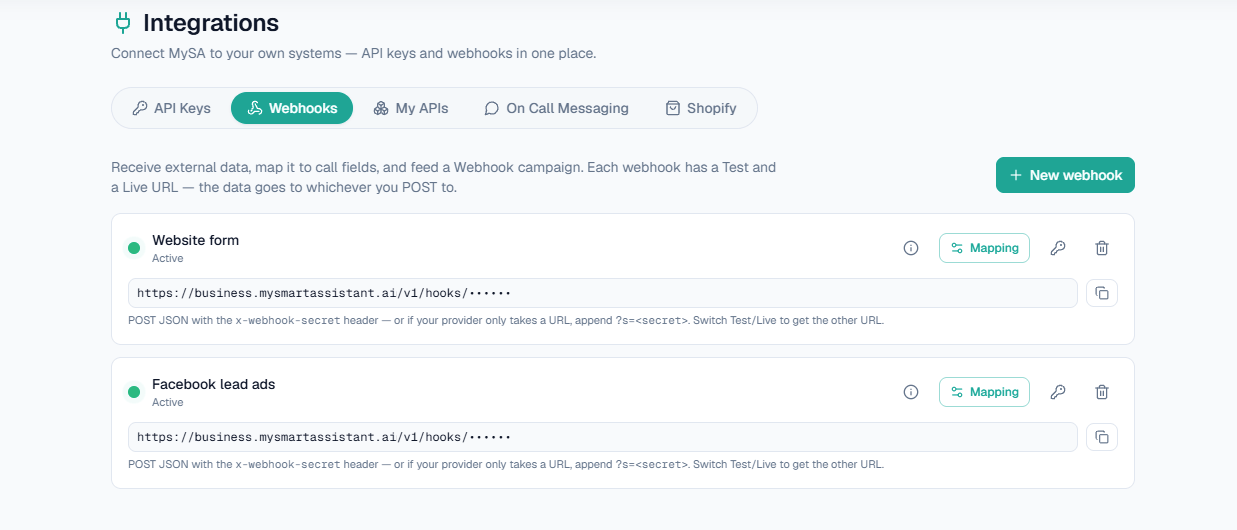
MySA does not fetch leads from Facebook or Justdial on its own; something has to post them to the webhook URL. If your source can only paste a URL and not add a header, the secret can go in the URL instead. The fields, statuses and payload examples are in the webhooks documentation, and the overview is on the webhook campaigns page. For Meta ads step by step, see call Facebook leads instantly.
Other ways a lead reaches the pit lane
- Your own CRM or app. An API campaign is created empty, and your system pushes contacts to it with an API key, including what the customer asked about so the AI can open with it. See campaigns.
- WhatsApp messages. WhatsApp Auto-Call places an AI call right after a customer messages your number, Instant or after a short delay. It is a premium feature your workspace must be enabled for.
- Instagram and Facebook chats. Call when the customer agrees asks once in the chat whether your team may call, and on a yes an AI call goes out in the customer's language. See Instagram and Facebook.
Pit wall rules: the limits that keep fast calling polite
Fast should not mean pushy. A Webhook campaign has its own controls:
| Control | What it does |
|---|---|
| Max calls to one customer / day | 1 to 10 calls to the same number per day, 2 recommended |
| Minimum gap between calls | At least 60 minutes between two calls to the same number |
| Summary window | Messages from one number within a few seconds become one call |
| DND hours | A call that falls in your quiet hours is held, not dropped, and goes out when they end |
| Prepaid wallet | Live calls are paid from your wallet |
So a lead that arrives at 11:40 PM is called in the morning, not at midnight. Make sure your forms make clear the customer is asking to be called back.
What the AI asks on the first call
You decide the call's purpose: qualify the lead, confirm what they want, book a visit, or check budget and timing. The AI answers questions only from your Business Details, so it will not quote a price or offer you have not written down.
Example: a furniture showroom's Facebook lead, called within a minute
AI: Namaste Rohit ji, main ABC Furnishings se bol rahi hoon. Aapne abhi sofa ke liye form bhara tha. Do minute baat ho sakti hai?
Caller: Haan, boliye. 3-seater dekhna tha, fabric wala.
AI: Zaroor. Budget roughly kitna soch rahe hain, aur delivery kis area mein chahiye?
Caller: Pachees-tees hazaar tak, Andheri West.
AI: Theek hai. Showroom aakar fabric dekhna chahenge? Kis din aana suit karega?
Caller: Sunday 11 baje aa jaunga.
The showroom is made up. After the call, the business sees the recording, an AI summary with interest and outcome, sentiment and tags in Call Logs. If the customer had said "shaam ko call karna", a follow-up would wait in Follow-ups for that time, and with Auto-callback on, the AI rings them then. Because Rohit named a day, Visit reminders, if you switch them on, rings him on Sunday to confirm he is still coming.
When the lead is ready to buy on the first call
Some leads want a person straight away: a bulk order, a negotiation, a site visit today. With call transfer set up, the AI hands the call to a named number such as Sales when the customer asks for a person or the conversation matches your "when to transfer here" words. Transfer works in the Live workspace only.
Fastest lap: what your team sees after the call
The point of a fast first call is that your team starts from answers, not a raw list of numbers:
- Call Logs. Every call with its recording, AI summary, sentiment and tags. Calls that need a person are flagged Needs a human.
- Positive Leads. Calls that achieved what they were dialled for, so sales calls the warm ones first.
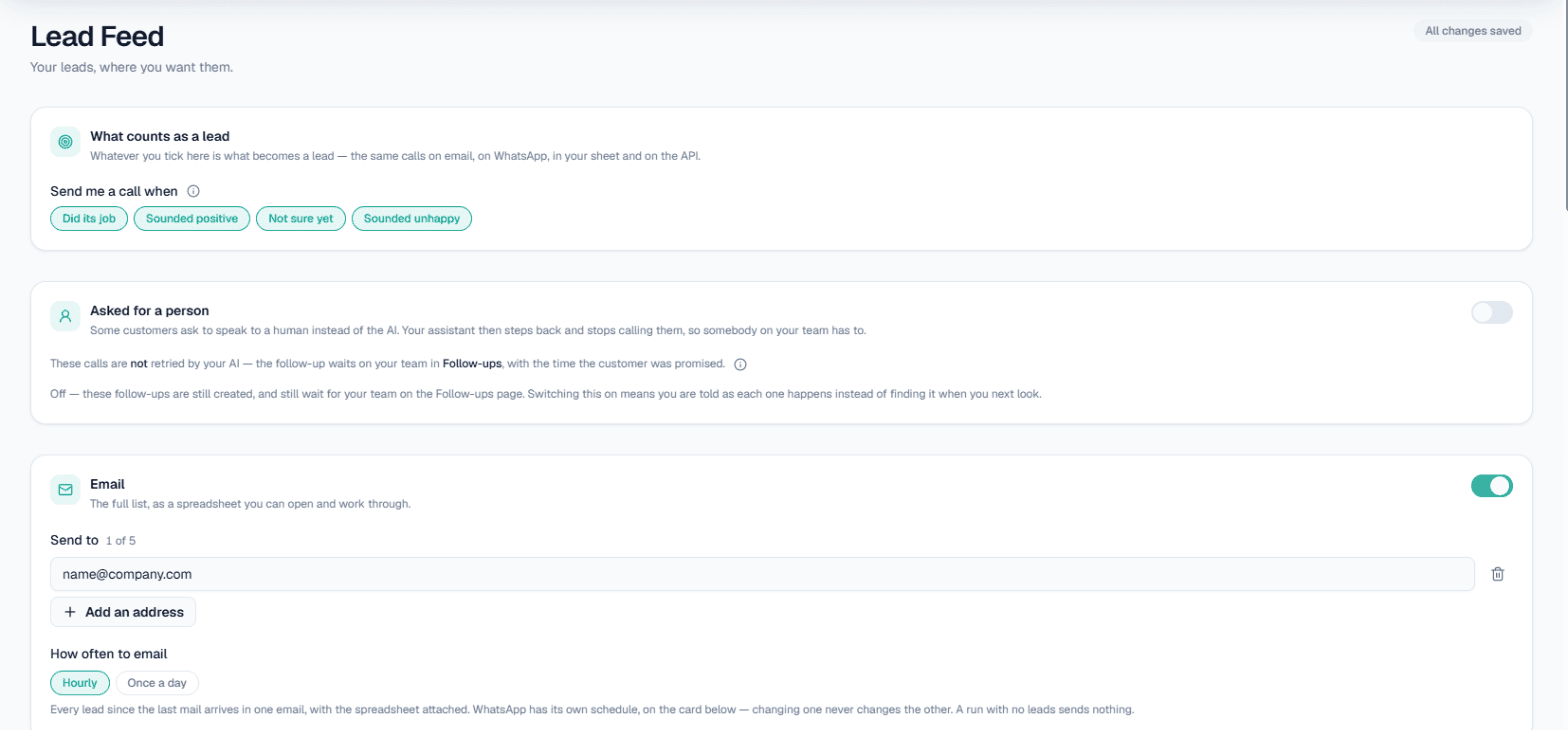
- Lead Feed. If it is enabled for your workspace, matching leads are delivered by email, Google Sheet, webhook, API or WhatsApp. See Lead Feed.
- Follow-ups. Call-backs customers asked for, at the time they asked. More on follow-ups.
How to track those leads once they leave the call is covered in lead tracking for AI calls. For enquiries that land on Saturday night, see weekend lead follow-up.
How to measure your speed to lead today
Before switching anything on, check where you stand:
- Pick ten recent form leads. Note when each came in and when someone first called.
- Note the misses. How many were never called, or called the next day.
- Check the hours. Were the slow ones mostly evenings, Sundays or busy shop hours.
- Listen to the first call. Did the caller know what the customer had asked for.
If the gaps cluster at night and on weekends, a Webhook campaign with sensible DND hours closes most of them. If the problem is the quality of the first call, write a clearer purpose and Business Details before you automate anything.
What works today, and what it does not do
| Works today | Does not do |
|---|---|
| Calls new webhook leads, usually within about a minute | Pull leads from Facebook or Justdial without something posting them |
| Asks the questions in your purpose, in the customer's language | Quote prices or offers missing from your Business Details |
| Holds calls inside your DND hours and places them after | Call at midnight because a lead arrived then |
| Transfers a ready buyer to a named number, in Live | Close the sale on its own; your team still does |
| Recording, summary, sentiment and tags on every call | Keep turn-by-turn transcripts |
These are example workflows, not customer stories. How much faster your team gets depends on your sources and your settings.
Getting started
- Create a workspace and verify your mobile number to get ₹100 of Test credit in the separate Test environment.
- Write your Business Details: products, timings, what you will and will not promise.
- Press Try now to hear an AI call on your own phone, then send one test lead to a webhook's Test URL. In Test, only numbers on your Test Numbers list are dialled.
- Set your DND hours and the per-customer limits.
- Go Live, top up the prepaid wallet, point your form or lead source at the Live URL, and run the Webhook campaign.
Calls of 10 seconds or less are free; longer calls are billed per started minute. The rate for your workspace is shown in the console. Talk to sales for volume pricing.