
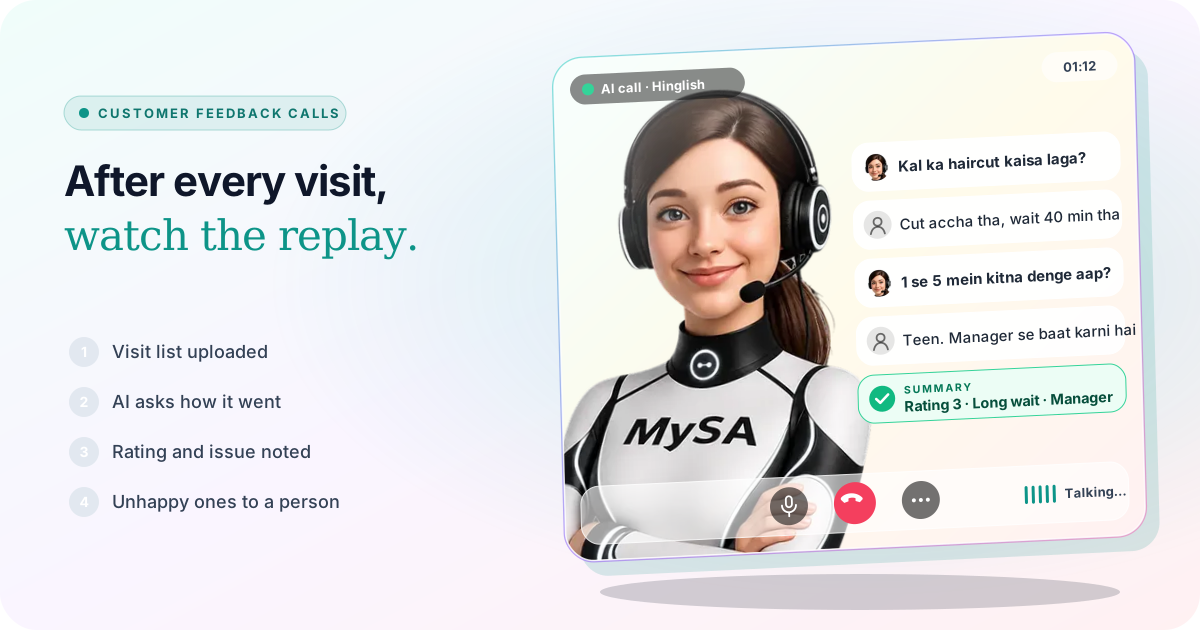
Customer feedback calls are short calls made after a purchase, a visit or a service, to ask the customer how it went, take a rating and hear anything that went wrong while it is still fresh. With MySA Business, an AI call campaign rings each customer in Hinglish, Hindi or their own language, asks the questions you wrote, and gives you back a summary, sentiment, tags and the recording for every call, with unhappy customers routed to a person on your team.
The replay every team watches
On 1 November 2026, Arsenal beat Liverpool 1-0 at Anfield, Kai Havertz scoring in the 16th minute (ESPN match page). Whichever side you support, the next part is the same in every football club: the coaches go back to the footage. Which pass went astray, which run nobody tracked, what to change before the next game.
Most businesses never watch their own replay. A customer leaves the salon, collects the bike from service or takes the sofa home, and the shop hears nothing more unless the customer is angry enough to post a review. The ones who were mildly unhappy simply do not come back. A feedback call is the post-match analysis: one call per customer, the same few questions every time, and a list of what to fix.
What to ask on a feedback call
Keep it short. A customer gives a minute to a feedback call, not five. Three to four questions work best:
- How did it go? An open question first, so the customer says what is on their mind.
- A rating. "1 se 5 mein kitna denge?" gives you a number you can compare week to week.
- One thing to improve. "Kuch aisa jo hum behtar kar sakte the?" This is where the real complaints come out.
- Anything pending. A bill question, a part to be replaced, a next appointment.
Write this as the campaign Purpose in plain words, for example: "Customer kal {var1} ke liye aaye the. Poochho visit kaisi rahi, 1 se 5 mein rating lo, aur ek cheez jo behtar ho sakti thi. Kuch bechna nahi hai. Agar customer naraz hai ya kisi se baat karna chahta hai, to note karo." Save it under Business → Purposes so every branch uses the same wording. More on writing purposes in Assistants and purposes.
Do not add an offer to the same call. A customer who was just asked for honest feedback and then pitched a package will trust the next call less.
Who to call, and when
Call the day after, not the same evening and not two weeks later. The visit should be fresh, and the customer should have had time to use the product or see the haircut in daylight.
- Daily list upload. Export yesterday's bills or bookings as an Excel file with
destination(the mobile number),customer_nameand columns such asvar1for the service,var2for the stylist or technician andvar3for the branch. Upload it as a CSV Upload campaign each morning. See Campaigns. - Straight from your system. If your billing or booking software can send a webhook when a visit closes, a Webhook campaign calls each customer automatically. Set Max calls to one customer / day and Minimum gap between calls so nobody is rung twice. See webhook campaigns.
- A long backlog. A Scheduled campaign with Split over days spreads last month's customers over a week, so the team can handle what comes back.
Calls that fall inside your DND hours are held and go out after the quiet window, so a list uploaded late at night does not ring anyone at night.
Example: a salon asks how the visit went
AI: Namaste Priya ji, main ABC Salon se bol rahi hoon. Kal aapka haircut hua tha, bas do minute feedback lena tha. Kaisa laga?
Customer: Cut accha tha, Neha ne bahut dhyan se kiya. Par appointment ke baad bhi 40 minute wait karna pada.
AI: Maaf kijiye, wait lamba tha. 1 se 5 mein aap visit ko kitna denge?
Customer: Teen. Aur main manager se baat karna chahti hoon, ye pehli baar nahi hua.
AI: Ji, samajh gayi. Main aapko abhi manager se jod rahi hoon.
The salon is made up. If call transfer is set up, the AI rings the manager's number, briefs them in Hinglish on who is calling and what she wants and connects the two. If it is not set up, the AI says the team will call back, and a Call from a person follow-up appears with Priya's own words.
A showroom can run the same call after a delivery: "Sofa time par aaya? Fitting theek hui? 1 se 5 mein delivery ko kitna denge?" A service centre asks about the bike, the bill and whether the problem is fixed.
VAR for your business: what comes back from every call
Each finished call lands in Call Logs with:
- AI Summary. "Haircut good, stylist Neha praised. Waited 40 min after appointment time, second time. Rating 3/5. Asked for manager." The rating the customer gave is in the summary in their own terms; there is no separate rating column, so ask for it the same way on every call.
- Sentiment. Positive, Neutral, Negative or No response, filterable in the list.
- Outcome and interest chips, and Needs a human on calls that need a person.
- What happened, Suggested next step and What the customer asked, where the AI had something to say.
- Tags. On the Tags page, add your own such as "Long wait", "Staff praised", "Billing issue" or "Product fault". The AI applies only tags from your list. See Call logs.
- The recording, to play when the summary is not enough. That is your VAR check: listen to the moment yourself before you decide anything about a staff member.
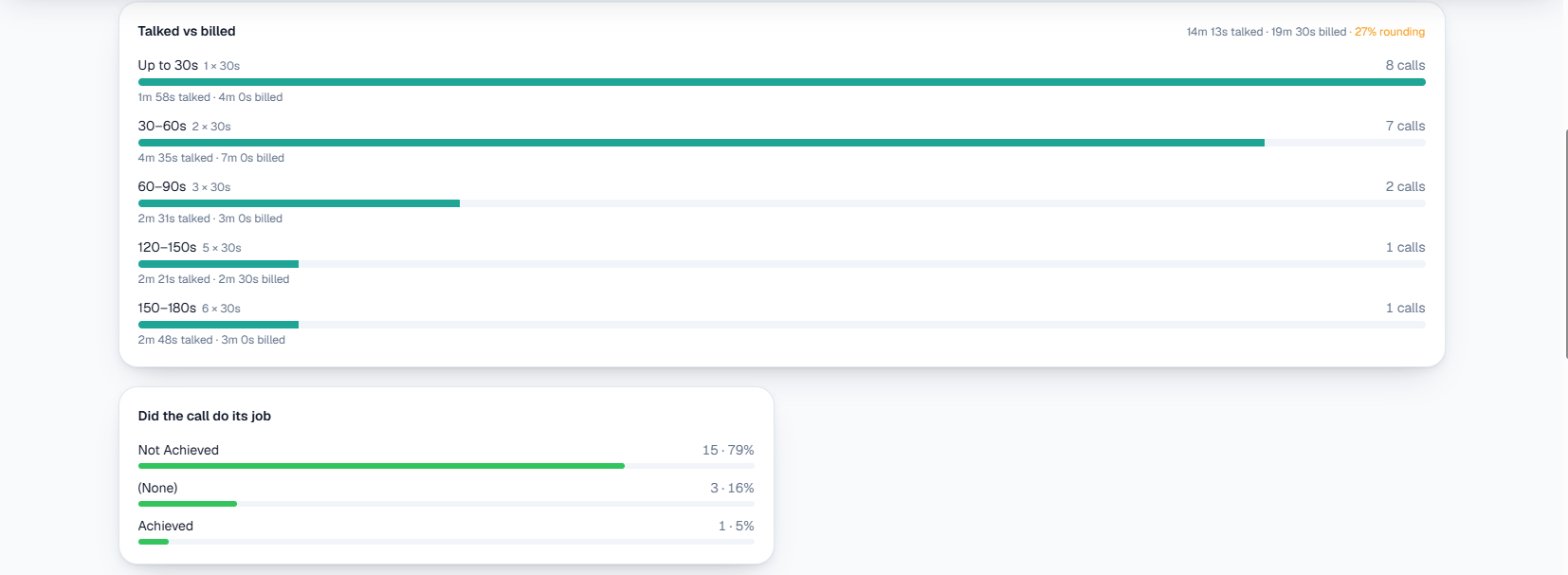
On Campaigns Analytics, Did the call do its job splits calls into Achieved and Not Achieved against your purpose, which tells you how many customers actually gave feedback rather than hanging up.
For a whole week in one table, the Detailed Report carries Sentiment, Purpose outcome, Tags, your variables and the AI Summary per call, and downloads as a CSV. Because var2 holds the stylist's name, you can sort the file by stylist and see whose customers mention the wait.
Unhappy customers go to a person, quickly
A feedback call that collects a complaint and then does nothing is worse than no call. Decide in advance who handles them.
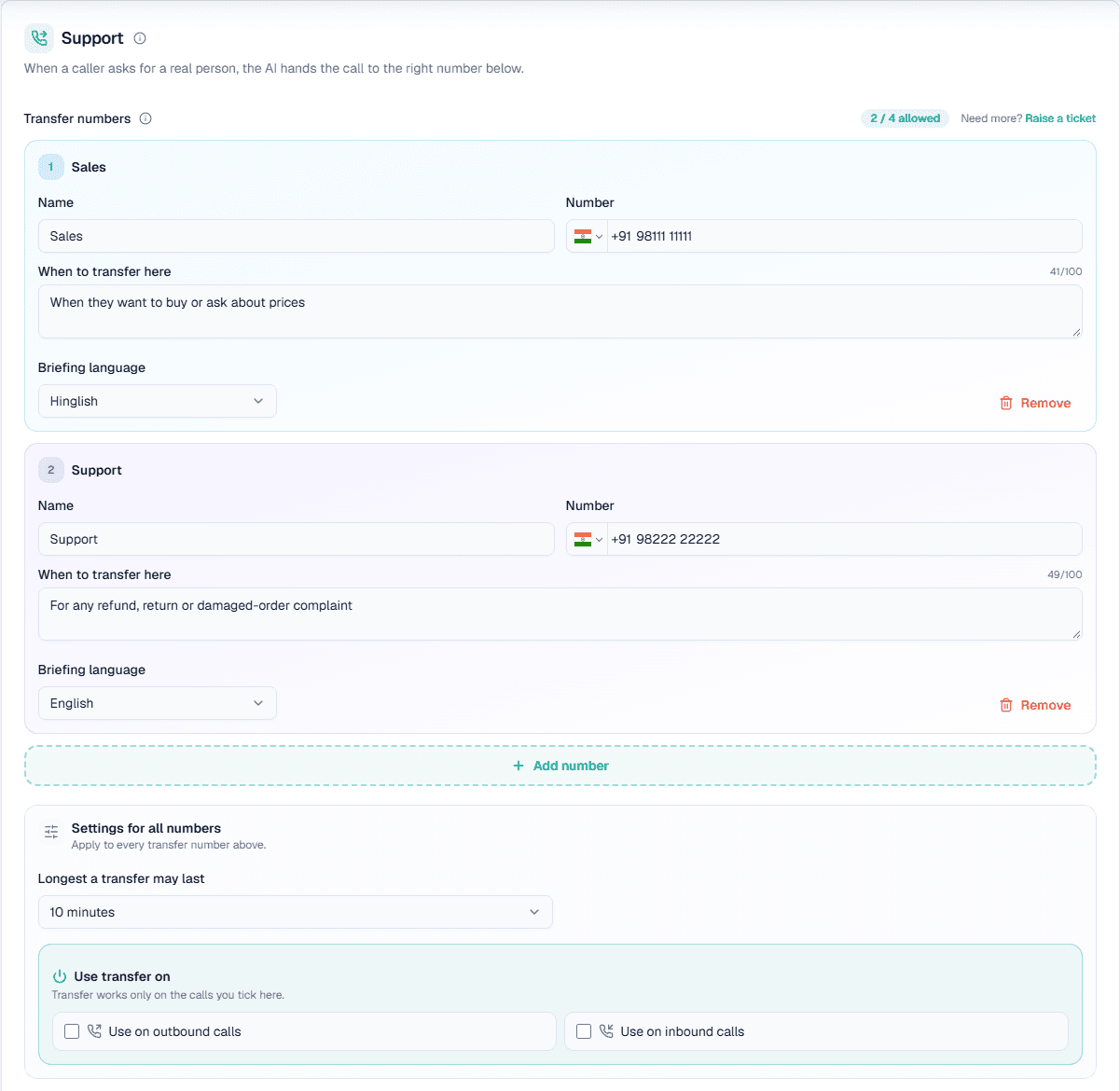
- Call transfer, during the call. In your Live workspace, the Owner sets up Phone system → Call transfer with named numbers, for example "Manager: when the customer is unhappy or asks for the manager". The AI picks the number by that line, briefs your colleague and connects the customer. See Call transfer and our guide to AI call transfer to a human.
- Call from a person. Without transfer, the customer's request shows on Follow-ups with the time they were promised, usually about half an hour. MySA never dials these rows itself. With Lead Feed enabled, Tell me when a customer asks to speak to a person alerts you at once. See Follow-ups.
- Negative sentiment each evening. Filter Call Logs by Negative and ring those customers yourself, even if they did not ask.
- "Abhi busy hoon, shaam ko call karo". The AI adds a follow-up for the time they gave; with Auto-callback on, it calls then. Our article on handling "call me later" covers this.
From replay to training session
The replay only helps if something changes before the next match. Once a week:
- Open the Tags breakdown for the last 7 days and note the top two complaint tags. Click a tag to see its calls. The call tags page shows how the board works.
- Download the Detailed Report and compare branches or staff using your variables.
- Fix one thing: an extra stylist on Saturday mornings, a delivery-slot call the day before, a clearer bill.
- Keep the same purpose for the next few weeks, so the ratings stay comparable.
Ratings over time tell you whether the fix worked. That part is still a spreadsheet job; MySA records the answers, your team draws the conclusions.
What works today, and what it does not do
| Works today | Does not do |
|---|---|
| Calls your customers after a visit or purchase with your questions | Post a Google review or ask the customer for one on your behalf |
| Summary, sentiment, tags, purpose outcome and recording per call | Store the rating as its own number; it sits in the summary |
| Hands an unhappy customer to a named person in Live, if transfer is set up | Decide whether a complaint about a staff member is fair |
| Creates a follow-up when the customer wants a call later or a person | Issue refunds, discounts or replacements |
| Holds calls during your DND hours | Send SMS or email |
These are scenarios, not customer stories. Hear your feedback call on your own phone before any customer does.
Getting started
- Create a workspace and verify your mobile number to get ₹100 of Test credit in the separate Test environment.
- Write your Business Details and save the feedback purpose under Business → Purposes.
- Press Try now: the AI rings your own phone, so you hear the questions as a customer will.
- Go Live, top up the prepaid wallet, set up Call transfer for the manager, and upload yesterday's visit list.
Calls of 10 seconds or less are free; longer calls are billed per started minute. The rate for your workspace is shown in the console. Talk to sales for volume pricing.