
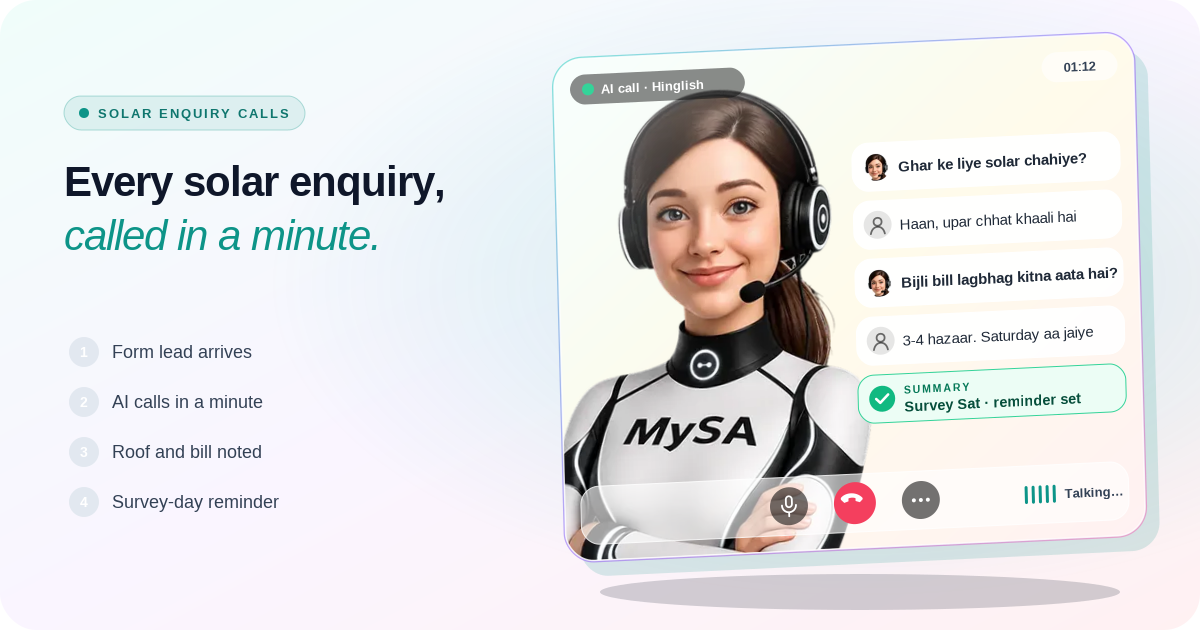
AI calling for solar installers means an AI voice assistant calls every rooftop solar enquiry for you: it rings the customer within about a minute of the form, asks the questions your surveyor needs (house or shop, roof type, monthly electricity bill, city), and notes the day they want the site survey. MySA Business does this from your own number, in Hindi, Hinglish or the customer's regional language, and hands the ready customer to your sales person. It suits rooftop installers, EPC firms, channel partners of panel brands and solar dealers in any district.
Why solar enquiries go cold
A homeowner who searches for rooftop solar usually fills two or three installers' forms the same evening. Whoever calls first and sounds sure gets the survey. Most small installers lose that race for a simple reason: the owner is on a roof, the one office person is chasing a DISCOM file, and the enquiry is called the next afternoon.
Solar leads also need more questions than most. A 1 kW system for a flat and a 10 kW system for a factory are different jobs, and a surveyor who drives out without knowing the roof or the bill wastes half a day. The call that qualifies the lead matters as much as the speed.
Call every enquiry within about a minute
Connect your website form, Facebook Lead Ads or any lead source that can post a lead to a MySA webhook campaign. Each lead posted to the webhook is dialled automatically, usually within a minute, even at 9 p.m. when the enquiry is freshest. Your DND hours still apply: a lead that arrives at midnight is held and called when the quiet hours end, not woken up.
Speed to lead explains why the first minute matters; for solar, it is often the difference between a survey and a "we already booked someone".
Ask the questions your surveyor needs
Write the purpose of the call in plain words, the way you would brief a new telecaller. For example:
- Is it a house, a shop or a factory?
- Roof: RCC slab, tin shed or a flat in a society?
- Roughly how much is the monthly electricity bill?
- Single-phase or three-phase connection, if they know?
- Which day suits them for a free site survey?
Put the facts you are happy to share in your Business Details: the areas you cover, the brands you install, whether you help with the PM Surya Ghar application, and the price range you quote openly. The AI answers only from those. It never invents a subsidy amount, a payback period or an EMI.
Example: a new rooftop enquiry
Example — Suraj Solar, a made-up installer in Jaipur, calls an enquiry from its website.
- AI: Namaste, Suraj Solar se bol rahi hoon. Aapne rooftop solar ke liye enquiry ki thi. Ghar ke liye chahiye ya dukaan ke liye?
- Customer: Ghar ke liye. Do manzila hai, upar chhat khaali hai.
- AI: Achha. Mahine ka bijli bill lagbhag kitna aata hai?
- Customer: Garmi mein teen-chaar hazaar, sardi mein kam.
- AI: Theek hai. Hamare engineer free site survey karke sahi size batayenge. Kaunsa din theek rahega?
- Customer: Saturday subah aa jaayiye.
- AI: Saturday subah ke liye note kar liya. Subsidy ke baare mein bhi engineer wahi samjha denge.
Afterwards your team sees a call summary ("house, two floors, empty RCC roof, bill ₹3,000–4,000 in summer, survey Saturday morning"), the customer's interest, a recording, and a visit reminder already set for Saturday. Fixing the engineer's route is still your team's job.
Remind the customer on survey day
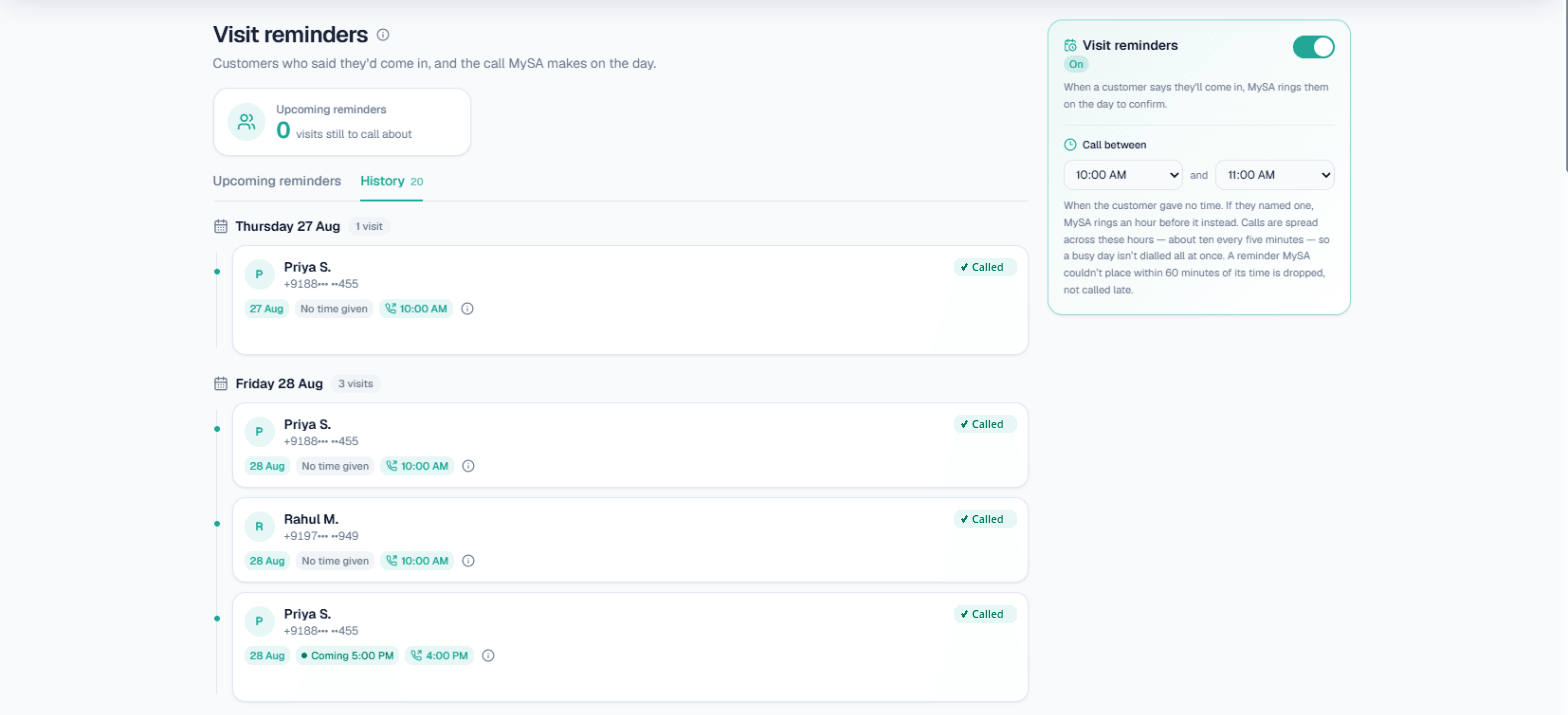
"Saturday aa jaayiye" is easy to forget by Saturday. With visit reminders switched on, MySA notes the plan from the call and rings the customer on that day, an hour before the time they named, or inside your Call between window if they named only a day. Every expected survey shows on Calling → Visit reminders, so whoever plans the engineers' day knows who is waiting. The same feature is explained for builders in site visit reminder calls.
"Abhi nahi, baad mein" and the subsidy question
Many solar buyers wait for a reason: the bill after summer, a bonus, a family decision. When a customer says "next month call karna", MySA creates a follow-up for that date on Follow-ups. With Auto-callback on, it dials then, in the same language.
When a customer asks something the AI cannot answer from your Business Details — the status of their subsidy, a DISCOM net-meter date, a specific inverter model — it says it will check and the call lands in Follow-ups as Action required. Your team answers once, and the AI calls the customer back with it. Subsidy rules and amounts belong to the government portal, pmsuryaghar.gov.in, and the AI should point there rather than quote a figure.
| Customer says | AI does |
|---|---|
| "Survey kab ho sakta hai?" | Notes the day and time, sets a visit reminder |
| "Kitne kW lagega?" | Says the engineer will confirm after the survey; notes the bill and roof |
| "Subsidy kitni milegi?" | Points to the official portal; promises your team will explain |
| "Next month baat karte hain" | Creates a follow-up for that date |
| "Owner se baat karao" | Transfers to the Sales number if you set up call transfer |
Old enquiries and installed customers
Every installer has a sheet of last season's enquiries that never booked. Upload it as a campaign from Excel, with columns var1 to var15 for each customer's details (city, bill, the date they enquired), and the AI asks whether they are still considering solar. A Scheduled campaign splits a long list over several days so your surveyors are not flooded.
Installed customers are a second list: a call before the dusty months to offer panel cleaning or an annual maintenance visit, using only the services and prices in your Business Details.
After the call: WhatsApp, DMs and your sales sheet
A call works best with a few things around it, all in the same console:
- WhatsApp right after the call. With On Call Messaging, an approved template goes out automatically after the call — your company name, a brochure link, the survey day the customer chose. Use your own WhatsApp Business number, or MySA WhatsApp if you have none.
- Comments and DMs on your solar ads. Solar ads on Facebook and Instagram fill up with "price?" and "kitna kharcha aayega?". With Instagram and Facebook connected, MySA replies to DMs and comments from your Business Details, and when a customer agrees to a call, the AI rings them.
- Interested leads to your sales team. Lead Feed, once enabled for your workspace, decides which calls count as leads and sends them by email, Google Sheet, webhook or WhatsApp, so the person planning surveys sees only the homeowners who said yes.
WhatsApp the people the AI could not reach
Some homeowners never pick up an unknown number. Where WhatsApp Broadcasts is enabled for your workspace, the Owner can send one approved template — "free rooftop survey this week, reply YES to book" — to a campaign's calls that did not connect, or to a CSV of last season's enquiries. It goes out from your own WhatsApp Business number or from MySA WhatsApp, now or on a schedule, opt-outs are left out, and the Review step shows the exact count and cost before you press Send. Each message is charged from your wallet.
Installed customers can get the same: a panel-cleaning or maintenance reminder before the dusty months, with the customer's name filled in.
What works today, and what it does not do
These are scenarios, not customer stories.
| Works today | Does not do |
|---|---|
| Calls form and ad leads within about a minute via a webhook | Pull leads from a portal on its own; something must post them |
| Asks roof, bill and site questions you write in the purpose | Size a system or promise savings |
| Visit reminders on the survey day the customer named | Plan your engineers' route |
| Answers from your Business Details in the caller's language | Quote subsidy amounts or file the PM Surya Ghar application |
| Recording, summary, sentiment and tags for every call | Replace the engineer's site visit |
| WhatsApp broadcast to enquiries the AI could not reach | Send WhatsApp without an approved template |
| WhatsApp after the call, DM replies, leads to your sheet | Reply on an Instagram or Facebook account you have not connected |
Getting started
- Create a workspace and verify your mobile number to get ₹100 of Test credit in the separate Test environment.
- Write your Business Details: areas you cover, brands, what you charge for a survey (or that it is free), and what you tell customers about subsidy.
- Press Try now — the AI rings your own phone. Ask it the questions a homeowner would.
- Go Live, top up the prepaid wallet, connect your enquiry form to a webhook campaign, and switch on visit reminders.
Calls of 10 seconds or less are free; longer calls are billed per started minute. The rate for your workspace is shown in the console — talk to sales for volume pricing.