
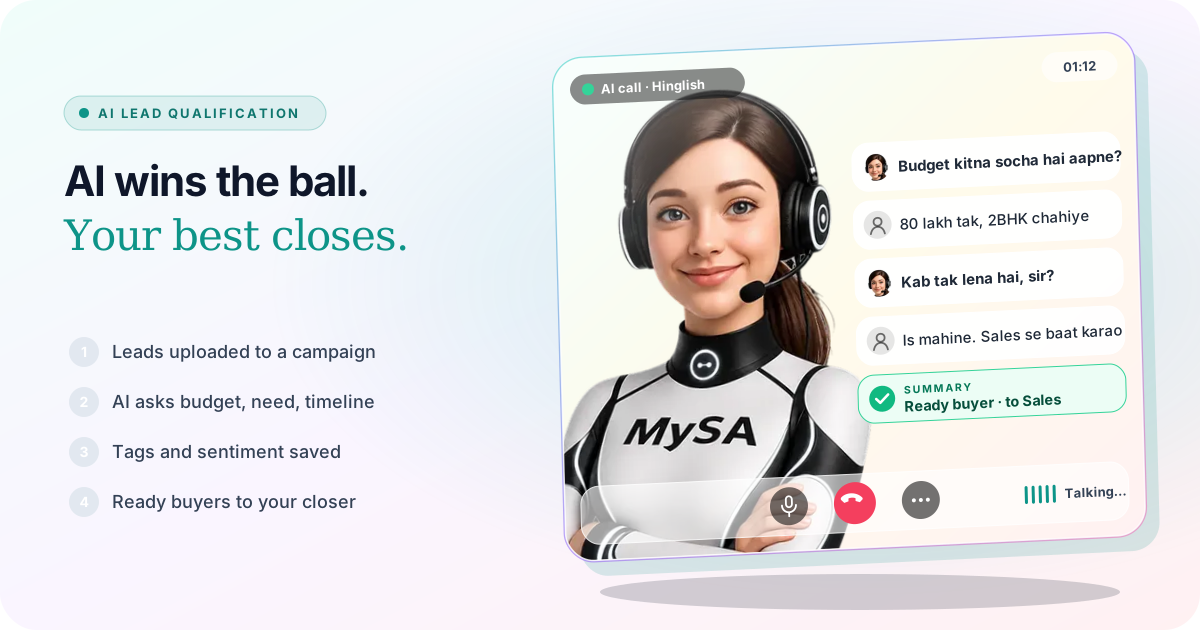
AI lead qualification means an AI voice assistant holds the first conversation with every new lead, asks the questions that separate a buyer from a browser, and passes only the ready ones to a person. In MySA Business the AI calls each lead with a purpose you write (budget, need, timeline, location), records how the call went, tags what was discussed, and delivers the leads that match your definition to your team. Your best salesperson spends the day on buyers, not on 200 cold numbers.
The assist, not the chase
On 1 November 2026 (2 November in India), Inter Miami came from behind to beat New England Revolution 2-1 in an MLS regular-season match in Foxborough. Lionel Messi set up the equaliser with a header back across goal for Germán Berterame, then scored the winner late in the game. That is why the fixture trended in India today.
The match is a useful picture for a sales team. A good side does not ask its best player to chase every loose ball. The midfield wins it, sorts out what is worth pursuing, and passes it to him at the moment he can do something with it.
Most sales teams work the other way round. The person who closes the most deals also dials every new enquiry, including the wrong numbers, the "just checking" calls and the ones who wanted a different city. AI lead qualification is the midfield: it does the running so your closer only touches the ball when it matters.
Why your closer should not dial 200 leads
A list of 200 leads from a property expo or a Facebook ad usually holds a small group of real buyers and a long tail of people who are not ready. Calling all of them by hand has a cost:
- Time. Unanswered calls, call-backs and "abhi busy hoon" take most of the day.
- Speed. While your closer works through the list in order, the keenest lead near the bottom is talking to another builder.
- Memory. Who said "next month", who wanted 3BHK, who asked about a loan? Without notes, the second call starts from zero.
The AI can call the whole list as a campaign, or call each form lead within about a minute of it arriving through a webhook campaign, and write down the answers every time.
The qualifying questions the AI asks
You write the call's Purpose in plain language, for example: "Confirm interest in the 2BHK project, ask the budget, whether it is for living or investment, when they want to buy, and the preferred location. Offer a site visit." Save it under Business → Purposes and pick it on the campaign. The AI works towards that goal; it does not read a script. See Assistants and purposes.
Most qualification comes down to four questions:
| Question | Why it matters | Example in a property call |
|---|---|---|
| Budget | Filters out leads you cannot serve | "Budget kitna socha hai?" |
| Need | Matches the lead to the right project or unit | 2BHK or 3BHK, ready-to-move or under construction |
| Timeline | Separates this month from next year | "Kab tak lena hai?" |
| Location | Keeps the visit realistic | Which sector or side of the city |
Columns var1 to var15 in your CSV can personalise each call, such as the project the lead enquired about or the expo where you met them. Answers are drawn from your Business Details, so the AI can talk about the project you described, but it will not quote a price or offer you did not write down.
A sample call: real estate in Hinglish
Example: ABC Realty, a made-up developer
AI: Namaste Rahul ji, main ABC Realty se bol rahi hoon. Aapne Sunday ke expo mein hamare 2BHK project mein interest dikhaya tha. Do minute baat ho sakti hai?
Caller: Haan, boliye.
AI: Aap ghar khud rehne ke liye dekh rahe hain ya investment ke liye? Aur budget kitna socha hai?
Caller: Khud ke liye. Budget 80 lakh tak hai.
AI: Samajh gayi. Aur aap kab tak shift karna chahenge?
Caller: Is mahine decide karna hai. Price thoda negotiate karna hai, kisi senior se baat karwa dijiye.
AI: Bilkul, main aapko abhi hamare sales head se jod rahi hoon. Unhe aapki details bata deti hoon taaki aapko dobara na batana pade.
The business is made up and so is the lead. If call transfer is set up, the AI rings your Sales number, briefs your colleague in a few words (own use, 2BHK, up to 80 lakh, wants to decide this month, wants to talk price) and then connects the call. If transfer is not set up, the request becomes a Call from a person follow-up for your team to ring back, and the AI does not dial it itself.
Customer says → AI does
| The customer says | What the AI does |
|---|---|
| "Budget 80 lakh, is mahine lena hai" | Notes it in the summary; the call can count as a lead if it did its job or sounded positive |
| "Kal shaam 6 baje call karna" | Schedules a follow-up at that time in the same language. See Follow-ups |
| "Main Sunday site dekhne aaunga" | With Visit reminders on, rings them on the day to confirm |
| "Kisi insaan se baat karao" | Transfers to your named number, or creates a Call from a person follow-up |
| "Loan ka process kya hai?" and it is not in your Business Details | Promises to check; the follow-up shows Action required until you answer |
| "Abhi interest nahi hai" | Ends politely; the call is marked by how it went and stays out of your lead definition if you choose |
The "how to handle call me later" cases are covered in more depth in our guide to handling call-back requests.
How a lead gets tagged and judged
After every connected call, MySA records:
- A summary with the suggested next step, in Call Logs, alongside the recording. See Call logs.
- Sentiment: Positive, Neutral, Negative or No response.
- Tags from your own list on the Tags page, such as Pricing, Site visit or Home loan. The AI applies only tags you listed and never invents new ones. See Analytics and reports.
- Whether the call did its job, measured against the purpose you gave it. These calls make up the Positive Leads list.
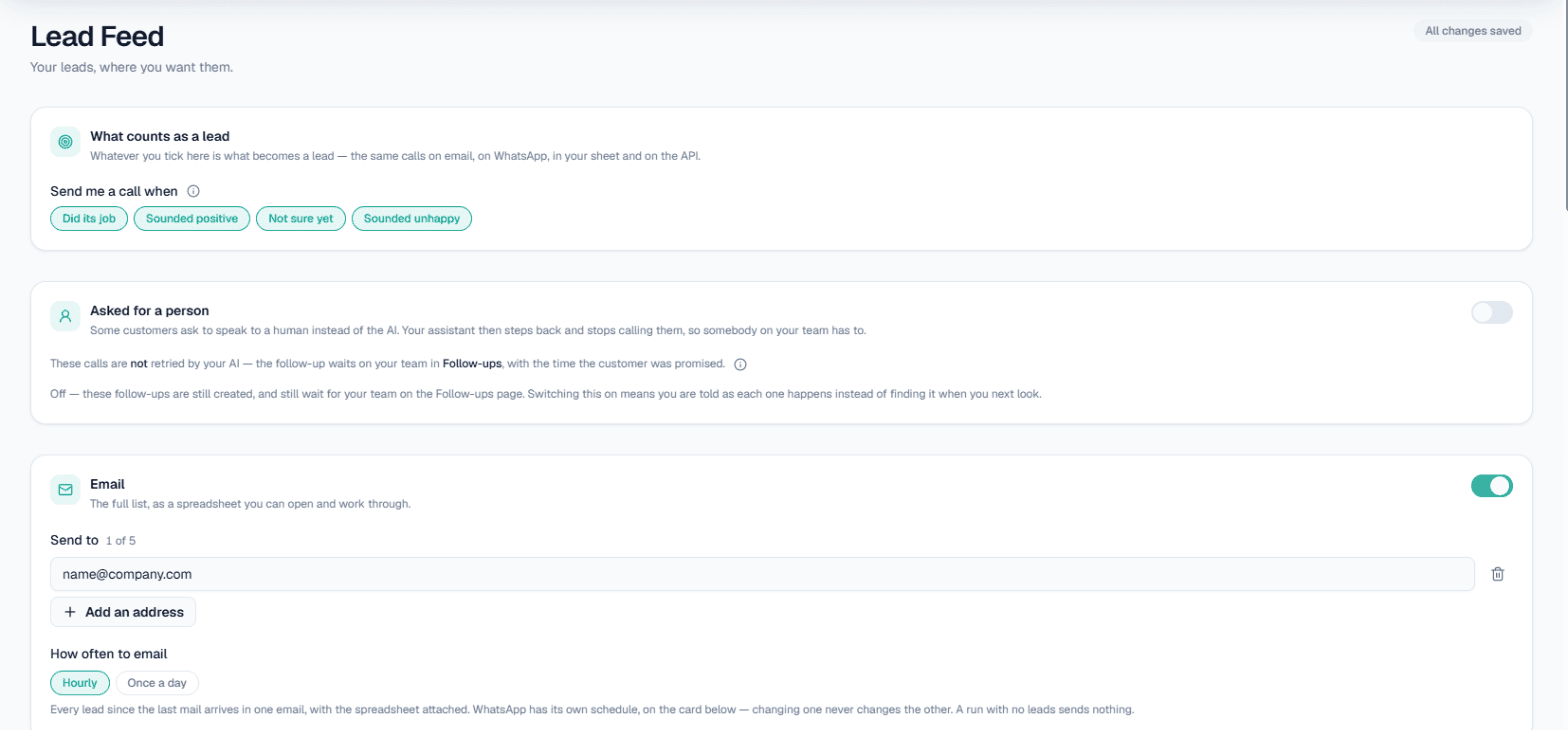
The AI does not decide on its own what a qualified lead is. In Lead Feed you tick what counts: Did its job, Sounded positive, Not sure yet, or even Sounded unhappy if you want to win those back. The full picture of where these records live is in lead tracking for AI calls.
The pass: getting ready buyers to your best salesperson
Qualification is only useful if the right lead reaches the right person quickly. There are three ways the pass happens.
During the call, with call transfer. Under Phone system → Call transfer, add a number named Sales with a "when to transfer here" line such as "when they want to book a site visit or discuss price". The AI picks the number by its name and that line, briefs your colleague in the language you chose, and connects the two. It runs in the Live workspace only, and the transfer minutes are billed separately at the rate shown on the card. The details are in Call transfer and our article on AI call transfer to a human.
Straight after the call, with Lead Feed. If Lead Feed is enabled for your workspace, matching leads go to email (hourly or daily, up to five addresses), a Google Sheet, a webhook to Pabbly, Zapier, Make or your CRM, a read-only API, or a paid WhatsApp nudge. Switch on Tell me when a customer asks to speak to a person to hear about those requests the moment they happen.
Later, at the time the customer chose. Call-backs and visit reminders keep the lead warm until it is ready for your closer.
Leads from chats follow the same path. On WhatsApp, Instagram and Facebook, the AI can offer a call when a customer shows buying intent and place it on a yes, which is explained in intent-based calling. The overview of every channel is on the AI lead qualification page.
What works today, and what it does not do
| Works today | Does not do |
|---|---|
| Calls every lead on a list, or each form lead within about a minute | Call inside your DND hours; those calls wait |
| Asks budget, need, timeline and location as your purpose says | Quote prices, discounts or offers you did not write down |
| Summary, sentiment and tags from your own list | Invent a tag or decide what counts as a lead for you |
| Transfers a ready buyer to a named colleague, with a briefing | Transfer on Test calls |
| Delivers leads to email, Sheet, webhook, API or WhatsApp | Close the sale; your salesperson still does |
These are workflows, not customer results. How many of your leads turn out to be ready depends on your list and your offer.
Which businesses it suits
- Real estate builders and brokers with expo, portal and ad leads. See AI calling for real estate.
- Car and bike dealers screening test-drive enquiries. See AI calling for car dealers.
- Coaching institutes and colleges sorting serious admission enquiries from browsers.
- Any business with one or two strong closers and more leads than they can call.
Getting started
- Create a workspace and verify your mobile number to get ₹100 of Test credit in the Test environment.
- Write your Business Details: projects, locations, what you can and cannot promise.
- Save a qualifying purpose under Business → Purposes and set up your Tags.
- Press Try now to hear the AI call your own phone, and adjust the purpose until the questions sound right.
- Go Live, top up the prepaid wallet, set up Call transfer and Lead Feed, and run the campaign.
Calls of 10 seconds or less are free; longer calls are billed per started minute. The rate for your workspace is shown in the console. Talk to sales for volume pricing.