
Vehicle delivery confirmation calls are the calls a showroom makes before a delivery: the slot is fixed, the papers are ready, the balance is paid, the buyer knows when to come. On an ordinary day the delivery desk makes a handful. On Dhanteras, Diwali and the auspicious wedding dates, the same desk has to make them for every buyer at once. MySA Business makes those calls with an AI voice assistant from your number, in Hindi, Hinglish or the buyer's regional language, and gives the desk a list of who is confirmed, who wants another time and who still has something pending.
Why delivery day goes wrong
Dhanteras fell on Friday, 6 November 2026, with Diwali on Sunday, 8 November. Buyers who booked weeks ago all want their car or bike on one of those days, often at a muhurat time a pandit gave them. Dealers' body FADA has expected record deliveries on Dhanteras in past years, and it is routinely the busiest delivery day of the year.
The trouble is rarely the vehicle. It is the buyer who arrives at 11 when the slot was 4, the finance approval nobody chased, the balance payment that was "kal kar denge", and twenty families in the showroom at the same hour. Every one of those is fixed by a call the day before. A delivery desk of two cannot make sixty calls while handing over keys.
This article is about buyers who have already booked. For enquiries and test-drive leads, see AI calling for car and bike dealers.
Call every buyer on the delivery list
Export the delivery list from your DMS or Excel and upload it as a campaign. Add columns var1 to var15 for each buyer's details: name, model and colour, delivery date, the slot, and what is still pending. Write the purpose with those placeholders: "{var1} ji, aapki {var2} ki delivery {var3} ko {var4} baje hai."
Brief the AI the way you would brief the delivery executive:
- Confirm the date and slot, or note the time the buyer wants instead
- Remind them of anything pending from your file: balance payment, insurance, documents for registration
- Ask how many people are coming, if you plan seating or sweets
- Note if they want a person from the delivery desk to call
A Scheduled campaign with On dates I pick can call the list once two days before and again the evening before, so a change of plan surfaces while there is time to act on it.
Example: confirming a Dhanteras slot
Example — Sharma Motors, a made-up car dealer, calls a buyer the evening before delivery.
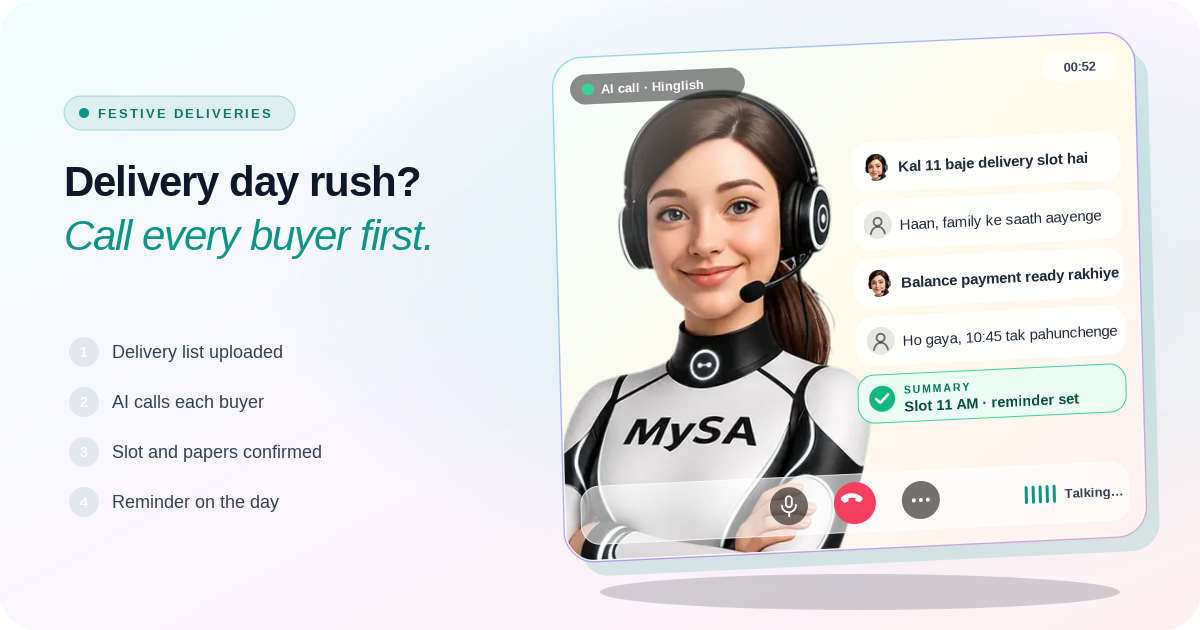
- AI: Namaste Verma ji, Sharma Motors se bol rahi hoon. Aapki nayi car ki delivery kal 11 baje hai — kya ye time theek hai?
- Buyer: Haan, family ke saath aayenge. Muhurat 11 se 12 ka hai.
- AI: Bahut accha. Aapka balance payment abhi pending dikh raha hai — kya wo delivery se pehle ho jayega?
- Buyer: Aaj shaam transfer kar dunga. 10:45 tak pahunch jayenge.
- AI: Theek hai, kal 10:45 par aapka intezaar rahega.
Afterwards the delivery desk sees a summary ("confirmed 11 AM, family coming, balance to be paid tonight"), and because the buyer named a time, a visit reminder rings them an hour before it. The AI read the pending payment from the file; it did not quote an amount or a discount that was not in it.
When the buyer wants another slot
Some buyers will want a different hour, usually the one their muhurat falls in. On an outbound call the AI does not move your delivery schedule; only your team knows which bays and executives are free. It notes the time asked for, and the call lands on Follow-ups as Action required, so the desk sees every change request in one list instead of on six phones.
| Buyer says | AI does |
|---|---|
| "11 baje theek hai" | Confirms, and sets a visit reminder for that time |
| "Shaam 5 baje kar do" | Notes the request as an Action required follow-up |
| "Loan abhi approve nahi hua" | Notes it in the summary for the finance desk |
| "Number plate kab milegi?" | Answers from Business Details, or promises to check |
| "Delivery wale se baat karao" | Transfers to the Delivery desk number if you set up call transfer |
"Meri gaadi ready hai?" on your inbound number
The week before a festival, the showroom phone rings with one question in many forms: is my vehicle ready, what time should I come, what should I bring. Switch on inbound calls for your number and the AI answers from your Business Details: showroom timings on the festival day, the documents to bring, where to park.
A buyer's own delivery status lives in your system, not in Business Details. If your DMS can serve it through an API, register it under Integrations → My APIs and tick it on that number; custom APIs let the AI read that buyer's status while they are on the line. Without one, the AI does not guess. It says your team will check, and the call becomes a follow-up.
Delivery week: WhatsApp, Instagram and the showroom floor
The rest of MySA covers the work around the calls:
- Location and checklist on WhatsApp after the call. With On Call Messaging, an approved template goes out after each call: the showroom location, the documents to bring, the delivery-day timings. Use your own WhatsApp Business number, or MySA WhatsApp if you have none.
- One message to buyers the campaign did not reach. Where WhatsApp Broadcasts is enabled for your workspace, the Owner can send one approved template to the buyers a campaign did not connect with, with each buyer's name filled in. The Review step shows the count and cost before you press Send.
- "Delivery kab milegi?" in your Instagram DMs. With Instagram connected, MySA replies to DMs and comments from your Business Details.
- Confirmed buyers to the desk's sheet. Lead Feed, once enabled for your workspace, sends the calls you count as leads by email, Google Sheet, webhook or WhatsApp.
After the keys: thank-you and first-service calls
A delivery is the start of the service relationship. A few days after the festival, a short campaign can call each buyer to ask whether everything is fine and note any complaint for the service manager. Weeks later, the same list with the first-service date in a var column becomes your first-service reminder campaign, the way service-due calls work for older customers.
What works today, and what it does not do
These are scenarios, not customer stories.
| Works today | Does not do |
|---|---|
Calls your delivery list from Excel with model, slot and pending items (var1–var15) | Read your DMS unless you register an API for it |
| Visit reminders an hour before the time the buyer named | Move a delivery slot on an outbound call |
| Change requests collected as Action required follow-ups | Collect the balance payment on the call |
| Inbound answers from Business Details, delivery status from your API | Invent prices, discounts, accessories or delivery dates |
| WhatsApp after the call and to buyers not reached | Send WhatsApp without an approved template |
| Recording, summary, sentiment and tags for every call | Keep turn-by-turn transcripts |
Getting started
- Create a workspace and verify your mobile number to get ₹100 of Test credit in the separate Test environment.
- Write your Business Details: festival-day timings, the documents buyers bring, parking, who to ask for.
- Press Try now — the AI rings your own phone. Play a buyer who wants a different slot.
- Go Live, top up the prepaid wallet, and run the delivery list two days before your busiest day.
Calls of 10 seconds or less are free; longer calls are billed per started minute. The rate for your workspace is shown in the console — talk to sales for volume pricing.